We will be changing the following probe servers in the NAM region on 2026-1-13:
Miami, Florida (FL) – USA changing from: (162.254.202.35 / 2604:bc80:8001:3c:225:90ff:fee5:5c6) to: (167.253.66.14 / 2602:fcc0:2222:fd8c::10)
Seattle, Washington (WA) – USA changing from: (107.161.26.107 / 2604:180:1:6e::83b5) to: (216.106.186.150 / 2604:86c0:5001:5::10)
Please adjust your firewalls appropriately if you whitelist so your checks do not fail because of the probe IP address change. An always current and updated list of all the IP addresses for our probe servers can be found in the FAQ, a text file, and via DNS query: probes.nodeping.com.
[UPDATE – 2026-01-14 11:29 GMT-7] – WA IP change complete. FL IP changed failed and the FL probe has been removed from our system.
We will be changing the following probe server in the NAM region on 2025-11-05:
Detroit, Michigan (MI) – USA changing from: (74.80.184.138 / 2620:11f:7001:3::10) to: (216.106.180.136 / 2604:86c0:b001:5::2)
Please adjust your firewalls appropriately if you whitelist so your checks do not fail because of the probe IP address change.
An always current and updated list of all the IP addresses for our probe servers can be found in the FAQ, a text file, and via DNS query: probes.nodeping.com.
[UPDATE – 2025-11-05 11:36 GMT-6] – IP change complete.
We will be changing the following probe server in the NAM region on 2025-10-09:
Phoenix, Arizona (AZ) – USA (136.175.8.15 / 2605:8340:0:1::2) to (38.114.123.177 / 2604:86c0:a001:e::2)
Please adjust your firewalls appropriately if you whitelist so your checks do not fail because of the probe IP address change.
An always current and updated list of all the IP addresses for our probe servers can be found in the FAQ, a text file, and via DNS query: probes.nodeping.com.
[UPDATE – 2025-10-09 10:57GMT-7] – IP change complete.
Announcing: RDAP Check type — A Smarter Way to Watch Your Domains
We’re excited to introduce our newest monitoring check type, RDAP. Ever wish you could proactively know when your domains are about to expire, or ensure the nameservers configured at your registrar haven’t been changed? RDAP Checks make it easy.
What Is an RDAP Check?
RDAP (Registration Data Access Protocol) is essentially a modern, structured successor to WHOIS, letting you pull domain, ASN, or IP registration data over HTTP in JSON format. Unlike legacy WHOIS queries, RDAP delivers rich, programmable data with support for internationalization and extensibility about.rdap.org.
Now, NodePing can monitor that data for you! Use RDAP Checks to:
Stay ahead of domain expiration — never forget that renewal.
Ensure infrastructure consistency — verify nameservers and registration data on your schedule.
Monitor your RDAP services — get alerted instantly if your RDAP endpoint goes down.
Get actionable feedback — diagnostics help you pinpoint the issue faster.
At NodePing we strive to make monitoring smarter, easier, and more versatile. RDAP Checks slot right into that vision—whether you’re managing domains, enforcing infrastructure integrity, or keeping your RDAP services reliable.
Ready to try it? Head to your NodePing dashboard and give RDAP Checks a spin. Don’t have an account yet? No problem, sign up for a free, 15-day trial. As always, support is just an email away if you need help making it perfect.
With a Starlink antenna on hand, we thought it would be a fun experiment to see what the results would be of monitoring a Starlink connection from a residential connection with our AGENT check type. The AGENT check can be used to monitor any outbound connectivity from your location on any network. Starlink was an interesting case study for us to try our AGENT monitoring from. Some information we wanted to see was:
ICMP reliability
Packet loss out to the internet
HTTP connections
DNS queries
We targeted a handful of popular services, including our own blog page as well as a website that is hosted in Seattle. We targeted these DNS providers:
Google DNS
Quad9
Cloudflare
OpenDNS
For popular websites, we targeted:
Facebook
google.com
Our blog (WordPress)
An employee blog site in Seattle
These were all tested over IPv4 and IPv6, each website had its DNS record monitored over the different DNS providers, as well as HTTP monitoring directly to an IP address for that site to rule out DNS issues.
Hardware
To connect to Starlink’s network, the standard antenna was used. The computer was a Raspberry Pi 4 running Raspberry Pi OS.
ICMP Monitoring
The route that was taken from my current location was through Starlink’s network and then back down through Seattle and then out to the rest of the Internet. Below is an MTR from the home network to blog.nodeping.com on WordPress:
We assigned both PING and MTR checks to our NodePing AGENT. One to have a simple ping to check uptime, and the MTR to monitor packet loss and other networking statistics.
PING Monitors
After a month of monitoring, the results showed that my average ping uptime was roughly around 99.6% for IPv6 and 99.8% for IPv4
The majority of incidents were 1 minute timeouts. Only a few longer outages occurred. A few outages are noteworthy:
A 10 minute outage while the antenna was moved out of the way and obstructed
A 36 minute outage that was consistent with full network downtime shown by the other results
A 7 minute outage that also consistently happened with other checks
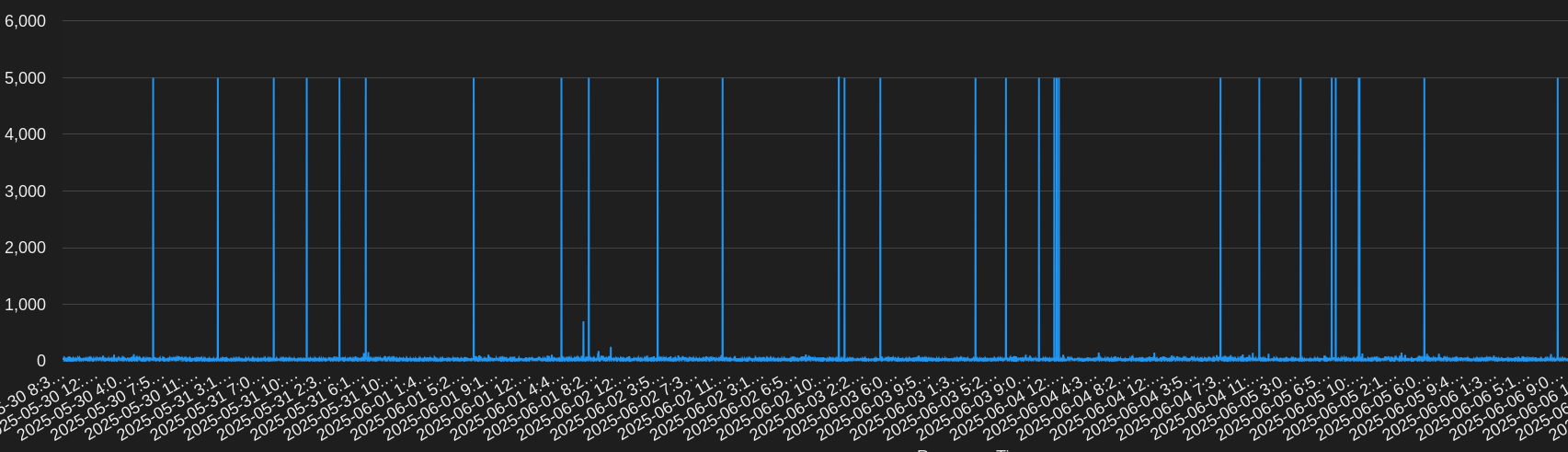
The average day showed about 10-20 events when there was typically a 1 minute timeout. This is roughly a 7-day sample of pinging Google’s site:
Generally, response times were very good and in the 20-30ms range with some blips up to about 100ms.
MTR Monitors
Our MTR monitoring paints a somewhat similar picture. The average uptime was about 99.7% to 99.9%. This is running an MTR count of 10 and expecting packet loss to be below 5%. Some observations:
A time when Google IPv6 had high packet loss for 9 minutes, at the same time OpenDNS was unreachable for 7 minutes
Moving the antenna was detected just like with the PING checks. This resulted in roughly 10% to 50% packet loss incidents
Like PING, there were quite a few times running an MTR would show packet loss or an unreachable target for a minute
I noticed most of my checks had packet loss more often in the evenings
At one point Google and Facebook had high packet loss or were unreachable for about 40 minutes
Below are some results from the MTR check to Facebook over IPv6:
I noticed that inter arrival jitter was high. The average seemed to be roughly in the 30s, however, it would also frequently go up into the upper 100s. This could potentially impact RTP streams.
Other Monitoring
DNS Monitors
During my testing, DNS checks were rather boring. The overall uptime was 99.9% with minimal timeouts or other issues. One day OpenDNS, Cloudflare, and Google DNS had 3 to 5 minutes of timeouts, but at different times of the day. Some days Quad9 ended up doing worse than others, but overall all the DNS services had that 99.9% uptime. At some times some services would timeout at the same time, but not others. Average responses were around 30-60ms. There were some incidents that happened, but I will expound on those in the next section.
Earlier it was noted that the antenna was moved and obstructed for a little while. All the checks were impacted by this obstruction. However, DNS was not.
HTTP Monitors
Last of all, HTTP monitors. The average uptime was 99.8%. While monitoring HTTP, I was able to use information from my DNS checks to get additional insights into the failures. While an HTTP check will mention it cannot resolve a hostname, the DNS checks provided additional detail into DNS failures and helped me to identify the cause of failed HTTP connections. For example, one day there was about a 5 minute window of failures when some hosts were unable to resolve hostname and others were getting ENETUNREACH errors. My default DNS resolver was Google DNS. At that time, I noticed that the other DNS services were not failing, only Google DNS. With that information, I was able to determine that I was unable to reach my websites because of the DNS provider I was using.
For some of my HTTP checks, I set some of the targets to be the IP address only so DNS was not resolved. At times when failures happened, I could see if the DNS and no DNS checks were failing. If they were, the site was unreachable. If only the DNS checks were failing, then the issue was likely with DNS. There was one outage that was 36 minutes long where my DNS and no DNS checks were failing.
The TLS EACCES errors show that a secure TLS connection could not be established. This often happens when there is a networking issue, since I know that the TLS certificates on the end are correct. This is especially obvious here since the TLS connection failures are happening to multiple services.
Conclusion
After a month of monitoring, it is clear to see that there is some network instability with Starlink. The service could not quite reach three 9s outbound. This could be perfectly sufficient for some, however, mission critical services will likely have frequent reachability issues.
Using AGENTs to monitor my Starlink connection provided me with some interesting results. While using our public probes, there were no incidents with the services I monitored. Using an AGENT to monitor outbound connections to services provided useful data to determine connectivity issues to commonly used services. This is useful when you need to monitor for incidents from a Starlink or any other remote connection and respond to them.
If you have any remote POPs that you need to monitor, try out our NodePing AGENTs today. We offer a free, no-obligation 15-day trial. The best way to see if NodePing meets your needs is to try it out.
The following server will be added to the North America Region on 2025/06/25:
Detroit, Michigan (MI) – USA (74.80.184.138 / 2620:11f:7001:3::10)
Additionally, we are changing the following probe server on 2025/06/25:
Melbourne, Australia (AM) – AU (144.48.37.241 / 2404:f780:2:950:216:3cff:feb8:ab8e) will change to (144.48.37.241 / 2406:d500:7:2::43)
Lastly, we are also removing the following probe server from the North America region on 2025/06/25:
Philadelphia, Pennsylvania (PY) – USA (208.82.130.170 /2604:bf00:214::10)
Please adjust your firewalls appropriately if you whitelist so your checks do not fail because of the probe IP address changes.
An always current and updated list of all the IP addresses for our probe servers can be found in the FAQ, a text file, and via DNS query, probes.nodeping.com.
[UPDATE – 2025-06-25 11:33GMT-7] – IP changes complete.
We will be changing the following probe server in the EAO region on 2025-05-27:
Sydney, Australia (AU) – AU (112.213.38.162 / 2404:9400:2:0:216:3eff:fee1:bce0) to (45.77.48.69 / 2401:c080:1800:1513:5400:5ff:fe62:f221)
We will be removing the following probe server from the NAM region on 2025-05-27:
Toronto, Ontario (OT) – CA (172.105.6.187 / 2600:3c04::f03c:92ff:fe9b:dd03)
Please adjust your firewalls appropriately if you whitelist so your checks do not fail because of the probe IP address changes.
An always current and updated list of all the IP addresses for our probe servers can be found in the FAQ, a text file, and via DNS query, probes.nodeping.com.
[UPDATE – 2025-05-27 11:43GMT-7] – IP changes complete.
The following server will be added to the North America Region on 2025/04/01:
Atlanta, Georgia (GA) – USA (23.111.153.22 / 2604:4500:5:54::10)
Additionally, we are changing the following probe server on 2025/04/01:
Ashburn, Virginia (VA) – USA (172.82.138.70 / 2607:3f00:1:a::10) to (199.233.235.34 / 2607:3f00:1:a::10)
Lastly, we are also removing the following probe server from the Europe region on 2025/04/01:
Madrid, Spain (ES) – ES (23.142.26.105 / 2604:86c0:f503:1::2)
Please adjust your firewalls appropriately if you whitelist so your checks do not fail because of the probe IP address changes.
An always current and updated list of all the IP addresses for our probe servers can be found in the FAQ, a text file, and via DNS query, probes.nodeping.com.
[UPDATE – 2025-04-01 11:15GMT-7] – IP changes complete.
Lastly, we are also removing the following probe server from the North America region on 2025/03/04:
Newark, New Jersey (NJ) – USA (209.205.207.243 / 2a06:8640:198::2)
Please adjust your firewalls appropriately if you whitelist so your checks do not fail because of the probe IP address changes.
An always current and updated list of all the IP addresses for our probe servers can be found in the FAQ, a text file, and via DNS query, probes.nodeping.com.
[UPDATE – 2025-03-04 12:54GMT-7] – IP changes complete.
Recently, Let’s Encrypt announced they will be ending support for expiration notification emails by June 4, 2025. With this upcoming change, many are looking to alternate ways to monitor certificate expiration dates. At NodePing, we offer the capability to monitor your SSL certificates with our SSL check. Our SSL check lets you monitor certificate validity as well as notify you when your certificate is about to expire, that way you can make sure your certificate renewals are happening as you would expect, and fix it when it’s not.
Using the SSL Check
Our SSL check isn’t just limited to monitoring port 443 on your web server. You can also monitor non-website TLS services by using the URL port convention. For example, setting the target to “https://example.com:8000”. The check can be used to monitor SSL certs on services such as DoH, MQTT, Websockets, email, anything that accepts a TLS connection.
The most popular use for the SSL check is to monitor for an expiration date and alert the user at a defined number of days before expiration. However, the SSL check is also useful for diagnosing certificate chain errors. This can be useful to diagnose missing intermediary certificates or mismatched certificates in the SSL chain, for example.
If you don’t have a NodePing account yet, give it a try! We offer a free, no-obligation 15-day trial. The best way to see if NodePing meets your needs is to try it out.
NodePing is an Internet web site and server monitoring service at an amazing price, allowing you to check all your website and servers as frequently as every minute, for as little as $10 a month. Our low prices include unlimited international SMS, slack, and email notifications. The 'Premiere' plan also includes unlimited voice notifications.



 NodePing