Starlink Monitoring with NodePing

With a Starlink antenna on hand, we thought it would be a fun experiment to see what the results would be of monitoring a Starlink connection from a residential connection with our AGENT check type. The AGENT check can be used to monitor any outbound connectivity from your location on any network. Starlink was an interesting case study for us to try our AGENT monitoring from. Some information we wanted to see was:

  1. ICMP reliability
  2. Packet loss out to the internet
  3. HTTP connections
  4. DNS queries

We targeted a handful of popular services, including our own blog page as well as a website that is hosted in Seattle. We targeted these DNS providers:

  • Google DNS
  • Quad9
  • Cloudflare
  • OpenDNS

For popular websites, we targeted:

  • Facebook
  • google.com
  • Our blog (WordPress)
  • An employee blog site in Seattle

These were all tested over IPv4 and IPv6, each website had its DNS record monitored over the different DNS providers, as well as HTTP monitoring directly to an IP address for that site to rule out DNS issues.

Hardware

To connect to Starlink’s network, the standard antenna was used. The computer was a Raspberry Pi 4 running Raspberry Pi OS.

ICMP Monitoring

The route that was taken from my current location was through Starlink’s network and then back down through Seattle and then out to the rest of the Internet. Below is an MTR from the home network to blog.nodeping.com on WordPress:

Start: 2025-06-05T17:10:24+0100
HOST: raspberrypi     Loss%   Snt Drop   Rcv   Last  Best   Avg  Wrst  Jttr Javg Jmax Jint
  1.|-- 192.168.1.1     90.0%    10    9     1    1.0   1.0   1.0   1.0   0.0  0.0  0.0  0.0
  2.|-- 100.64.0.1      30.0%    10    3     7   17.6  17.6  65.5 298.4   5.0 81.7 275. 516.6
  3.|-- 172.16.252.130  40.0%    10    4     6   19.1  19.1  49.6 154.4   5.3 44.0 130. 239.1
  4.|-- 206.224.65.146  40.0%    10    4     6  1192. 654.2 1011. 1192.  55.2 106. 405. 537.7
  5.|-- 206.224.64.37   30.0%    10    3     7   20.5  20.5  30.4  43.6   9.9 10.1 17.5 59.4
  6.|-- 206.81.81.70    40.0%    10    4     6   26.2  19.9  30.2  39.6  13.4  6.0 18.1 32.3
  7.|-- 192.0.78.12     50.0%    10    5     5   27.2  25.0  27.1  29.9   0.6  1.6  4.9  7.2

Each hop is as follows:

  1. Router
  2. SpaceX CGNAT
  3. SpaceX internal IP
  4. SpaceX public IP
  5. SpaceX public IP
  6. Seattle Internet Exchange
  7. automattic

We assigned both PING and MTR checks to our NodePing AGENT. One to have a simple ping to check uptime, and the MTR to monitor packet loss and other networking statistics.

PING Monitors

After a month of monitoring, the results showed that my average ping uptime was roughly around 99.6% for IPv6 and 99.8% for IPv4

The majority of incidents were 1 minute timeouts. Only a few longer outages occurred. A few outages are noteworthy:

  1. A 10 minute outage while the antenna was moved out of the way and obstructed
  2. A 36 minute outage that was consistent with full network downtime shown by the other results
  3. A 7 minute outage that also consistently happened with other checks

The average day showed about 10-20 events when there was typically a 1 minute timeout. This is roughly a 7-day sample of pinging Google’s site:
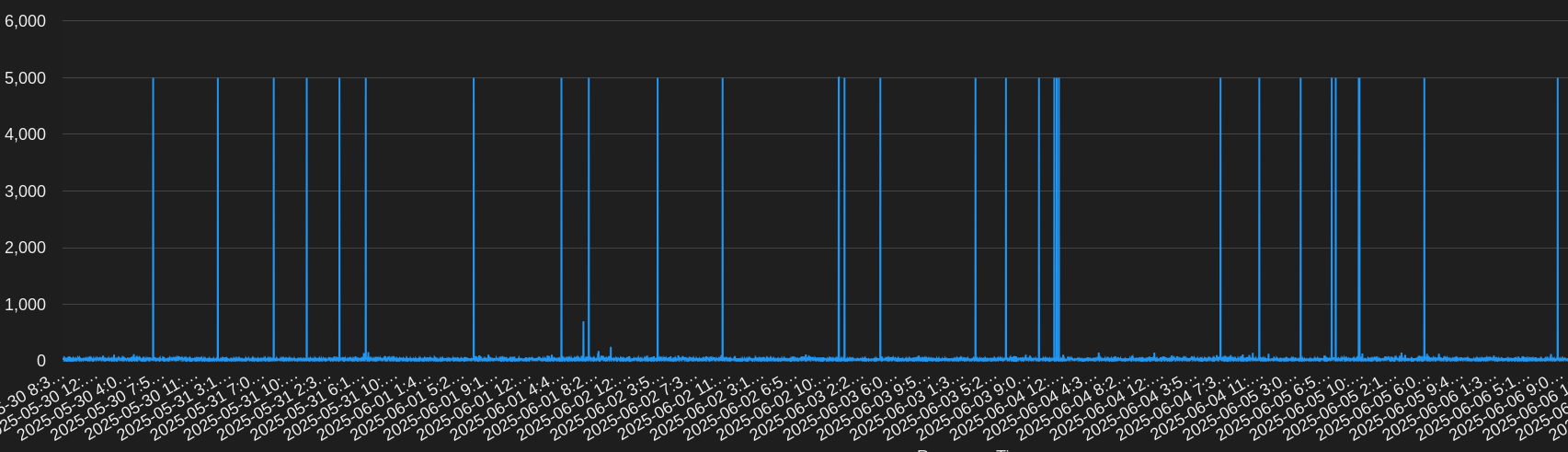
Generally, response times were very good and in the 20-30ms range with some blips up to about 100ms.

MTR Monitors

Our MTR monitoring paints a somewhat similar picture. The average uptime was about 99.7% to 99.9%. This is running an MTR count of 10 and expecting packet loss to be below 5%. Some observations:

  1. A time when Google IPv6 had high packet loss for 9 minutes, at the same time OpenDNS was unreachable for 7 minutes
  2. Moving the antenna was detected just like with the PING checks. This resulted in roughly 10% to 50% packet loss incidents
  3. Like PING, there were quite a few times running an MTR would show packet loss or an unreachable target for a minute
  4. I noticed most of my checks had packet loss more often in the evenings
  5. At one point Google and Facebook had high packet loss or were unreachable for about 40 minutes

Below are some results from the MTR check to Facebook over IPv6:

I noticed that inter arrival jitter was high. The average seemed to be roughly in the 30s, however, it would also frequently go up into the upper 100s. This could potentially impact RTP streams.

Other Monitoring

DNS Monitors

During my testing, DNS checks were rather boring. The overall uptime was 99.9% with minimal timeouts or other issues. One day OpenDNS, Cloudflare, and Google DNS had 3 to 5 minutes of timeouts, but at different times of the day. Some days Quad9 ended up doing worse than others, but overall all the DNS services had that 99.9% uptime. At some times some services would timeout at the same time, but not others. Average responses were around 30-60ms. There were some incidents that happened, but I will expound on those in the next section.

Earlier it was noted that the antenna was moved and obstructed for a little while. All the checks were impacted by this obstruction. However, DNS was not.

HTTP Monitors

Last of all, HTTP monitors. The average uptime was 99.8%. While monitoring HTTP, I was able to use information from my DNS checks to get additional insights into the failures. While an HTTP check will mention it cannot resolve a hostname, the DNS checks provided additional detail into DNS failures and helped me to identify the cause of failed HTTP connections. For example, one day there was about a 5 minute window of failures when some hosts were unable to resolve hostname and others were getting ENETUNREACH errors. My default DNS resolver was Google DNS. At that time, I noticed that the other DNS services were not failing, only Google DNS. With that information, I was able to determine that I was unable to reach my websites because of the DNS provider I was using.

For some of my HTTP checks, I set some of the targets to be the IP address only so DNS was not resolved. At times when failures happened, I could see if the DNS and no DNS checks were failing. If they were, the site was unreachable. If only the DNS checks were failing, then the issue was likely with DNS. There was one outage that was 36 minutes long where my DNS and no DNS checks were failing.

The TLS EACCES errors show that a secure TLS connection could not be established. This often happens when there is a networking issue, since I know that the TLS certificates on the end are correct. This is especially obvious here since the TLS connection failures are happening to multiple services.

Conclusion

After a month of monitoring, it is clear to see that there is some network instability with Starlink. The service could not quite reach three 9s outbound. This could be perfectly sufficient for some, however, mission critical services will likely have frequent reachability issues.

Using AGENTs to monitor my Starlink connection provided me with some interesting results. While using our public probes, there were no incidents with the services I monitored. Using an AGENT to monitor outbound connections to services provided useful data to determine connectivity issues to commonly used services. This is useful when you need to monitor for incidents from a Starlink or any other remote connection and respond to them.

If you have any remote POPs that you need to monitor, try out our NodePing AGENTs today. We offer a free, no-obligation 15-day trial. The best way to see if NodePing meets your needs is to try it out.

Monitoring Let’s Encrypt Certs

Recently, Let’s Encrypt announced they will be ending support for expiration notification emails by June 4, 2025. With this upcoming change, many are looking to alternate ways to monitor certificate expiration dates. At NodePing, we offer the capability to monitor your SSL certificates with our SSL check. Our SSL check lets you monitor certificate validity as well as notify you when your certificate is about to expire, that way you can make sure your certificate renewals are happening as you would expect, and fix it when it’s not.

Using the SSL Check

Our SSL check isn’t just limited to monitoring port 443 on your web server. You can also monitor non-website TLS services by using the URL port convention. For example, setting the target to “https://example.com:8000”. The check can be used to monitor SSL certs on services such as DoH, MQTT, Websockets, email, anything that accepts a TLS connection.

The most popular use for the SSL check is to monitor for an expiration date and alert the user at a defined number of days before expiration. However, the SSL check is also useful for diagnosing certificate chain errors. This can be useful to diagnose missing intermediary certificates or mismatched certificates in the SSL chain, for example.

If you don’t have a NodePing account yet, give it a try! We offer a free, no-obligation 15-day trial. The best way to see if NodePing meets your needs is to try it out.

The Best of Times, the Worst of Times

As 2016 is coming to a close, we decided to look back on the past 4 years of data to see if we could find any interesting patterns in the ‘down’ events our customers experience.

Downtimes caused by timeouts have fallen each year from 85% of all ‘down’ events in 2012 to 67% this year while websites 500 errors are on the rise, nearly 80% year-over-year. I suspect it’s due to the increase use of CDNs like CloudFlare that are now kicking back 503s rather than the timeouts the source servers are showing.

Looking at our numbers, if your servers go down, there’s a slightly higher chance it will happen around 3:20 UTC on a Wednesday. Alerts will be most quiet around 16:45 UTC on Sundays.

From our data, a sysadmin’s worse day is around Nov 10 and the best is easily January 1.

So brace yourself for this Wednesday and hang in there… New Years is right around the corner.

Monitoring Memory Usage in Node Applications

I recently started a new node.js project that stored a good bit of data in memory, and talked to clients over web sockets as well as providing a REST interface. The combination of components meant there were several spots that I wanted to monitor.

For the WebSockets, I hooked up NodePing’s WebSocket check. In this case, I didn’t need it to pass any data, just connect and make sure the WebSocket interface was accessible. This was a quick win, and in seconds I was monitoring the WebSockets interface of my new app.

One of our concerns with this particular application was how much memory it would use over time, since it retains quite a bit of data in memory for as long as the server is running. I was curious about how much memory it would end up using in real use. I was also concerned about any memory leaks, both from the data caching and the use of buffers as the system interacted with WebSockets clients. This called for monitoring memory usage over time and getting notifications if it passed certain thresholds.

To accomplish this, I used NodePing’s HTTP Parse check. In my node app, I created a route in the REST interface that would return various statistics, including record counts in the cache and a few other things I was curious about. The key piece for monitoring purposes, though, was the output from the node.js process.memoryUsage() call. This gives me a nice JSON object with rss, heapTotal, and heapUsed numbers. This was in combination with some other stats I wanted to capture, and the output looked something like this:

 {
  "server": {
    "osuptime": 22734099.6647312,
    "loadavg": [
      0.17041015625,
      0.09814453125,
      0.12451171875
    ],
    "freemem": 1883095040,
    "processmem": {
      "rss": 77959168,
      "heapTotal": 63371520,
      "heapUsed": 30490000
    }
  }
}

Next I added an HTTP Parse check in NodePing, and added the rss and heapUsed fields to the check. For the check setup, we use JSONPath syntax, so the full fields looked like this:
server.processmem.rss
server.processmem.heapUsed

At first I was a little startled by the results of this. The rss figure is consistently a good bit higher than the heapUsed number, and it climbs slowly over time. At first glance this looks like the system has a memory leak. However, it turns out this is normal for node.js applications. Node manages the memory used internally, and the rss figure shows what’s been allocated at some point and is still reserved, but not what’s actually in use. The heapUsed figure, on the other hand, does reflect Node’s periodic garbage collection.

I found the HTTP Parse check to be perfect for watching memory usage and checking for a memory leak in my Node application. The key was capturing the heapUsed as reported by Node. In my case I had the check grab this information once a minute, and I quickly had a handy chart showing the total memory usage of my application over time. As a result, trends become quickly apparent and I can see how my memory usage grows and shrinks as Node manages its memory usage.

Since I was hitting the REST interface of my application once a minute to collect the memory information, this had the side benefit of notifying me if the REST interface ever goes down. If I wanted to chart the REST interface’s response time, I’d add a separate HTTP check.

At NodePing, a lot of what we’ve built originated in our own experiences building and supporting Internet-based services. This is another example of how we have used our own monitoring systems internally to help us build and maintain our own systems.  If you  and haven’t tried out NodePing’s monitoring, check out our 15-day free trial.

HTTP Advanced Check

Our HTTP checks for website monitoring at NodePing already include our standard HTTP Check, the HTTP Content Check that lets you verify that specific content is present or is not present in the page, and the HTTP Parse Check that allows you to track and alert on arbitrary data points in the response. Today we’re excited to announce that we’re adding the HTTP Advanced Check to our HTTP line up.

The new HTTP Advanced Check adds the following capabilities:

  • simulate a form POST to your web site and verify the expected response
  • check for arbitrary HTTP response status codes for custom API servers
  • send HTTP headers
  • verify specific HTTP headers are being received
  • send PUT, DELETE, HEAD, TRACE, or CONNECT methods

This will allow you to do more in-depth monitoring of your HTTP services. Use cases may include:

  • POST incorrect credentials to log in pages and verify the HTTP status code of 403 is returned.
  • Send mobile browser User-Agent headers and use the content checking to verify the mobile version of your site is being shown
  • Verify a PDF link is returning a PDF file by checking the return header for the correct ‘Content-Type’:’application/pdf’
  • Verify your redirect script is returning a 302 status code and not an error.

Additional information about this new check type can be found in our documentation.

The HTTP Advanced check is now available on all NodePing accounts. All accounts also include unlimited notifications, including international SMS. If you don’t have a NodePing account yet, please sign up for our free 15-day free trial.

Minor API enhancements added today

We have a couple of updates to our API.

You can obtain the current status of your checks using /api/1/results/current. This returns a list of checks that currently have an “event,” which means that the check is currently disabled or is listed as “down.” The information returned will include a timestamp when the event started. Checks not listed in the results for this call are currently “up.”

We’re also adding a couple of convenience tweaks. When you are getting a list of checks, you can add a “current” parameter in order to have any current events added to the check information. This basically mixes the information from the “current” call mentioned above in with the list of checks.

Additionally, when you are getting a single check, you can add a “lastresult” parameter to the request and get the most recent result for that check along with the check information.

All three of these changes are included in our API Reference documenation. Hopefully these minor enhancements will be of help. Feedback is welcome here or at support@nodeping.com.

Don’t let your certificate expirations catch you offguard

Microsoft’s recent slipup with a certificate that caused outages for the Azure service is a reminder for the rest of us to make sure we are keeping a close eye on certificate expirations. Having a certificate expire on you makes you company look really inept, but in practice keeping track of certificates and when they expire can be a pain if you are trying to do it manually. A system that monitors certificates and reminds you before they will expire can be an excellent way to avoid having this happen to you, and is much easier than tracking them in a spreadsheet or sticky notes.

NodePing provides a few different ways to keep ahead of certificate expirations. For web servers, we have an SSL Check specifically designed to check the validity of SSL certificates and warn you a set number of days before they expire. You can set the number of days to anything that is useful for you. We typically suggest a couple of weeks in advance of the expiration.

Certificate expirations can also hit other types of services as well. Our email checks (SMTP, POP, and IMAP) can verify the SSL/TLS certificates used by each of these servers. Similar to the SSL check for web services, these checks verify that the SSL certificate is valid and working, and also can be set to warn you a certain number of days before they expire.

Tracking your certificates can be a pain, but it doesn’t have to be. Using an automated monitoring system like NodePing for SSL Certificate monitoring can make the task easy and painless, and let you focus on more interesting things.

SIP Monitoring

If you run SIP servers, you’ll be pleased as punch to know we’ve just released a new SIP server monitoring check just for you. Now you can be alerted if your SIP server goes offline or isn’t responding to SIP commands.

SIP stands for “Session Initiation Protocol,” and refers to a signaling protocol that can run over TCP or UDP and is commonly used for voice and video communications. SIP servers are often the connection points for VOIP calls.

The check does not initiate a call, but rather tests that the the server accepts a SIP connection by sending the OPTIONS command and watching for the response. Even if your server does not support the OPTIONS command and returns an error, this indicates that the server is up and operating, so the check succeeds. You can find more information about this check in our SIP Check documentation.

This new SIP check is available today for all NodePing accounts. If you don’t have a server monitoring account with NodePing yet, head on over and sign up for our free 15-day trial.

RBL Monitoring

What better way to top off our email monitoring enhancements than with a new check type! We’re happy to introduce our RBL check.

RBL, or DNSBL, stands for “Real-time Black List,” and is used to publish the addresses of computers or networks linked to spamming, malware, or other abuses which system administrators may want to block from accessing their networks.

There are hundreds of RBLs in existence, which use a wide array of criteria for listing and delisting of addresses. These may include listing the addresses of zombie computers or other machines being used to send spam, listing the addresses of ISPs who willingly host spammers, or listing addresses which have sent spam to a honeypot system.

If the IP addresses of your servers appear on these RBLs, there’s a good chance you’ll have difficulty interacting with networks that subscribe to these RBLs. For instance, if your SMTP server is listed, you’ll likely be unable to send email to the systems that use the RBL you are listed on.

You can use our new RBL check to ensure that your servers aren’t listed and to receive notifications if they do get listed, allowing you to quickly take steps to remove your addresses from those RBLs. You can find more details about which RBLs we check and how to set them up in our RBL Check documentation.

Adding RBL checking to our already robust email monitoring checks for SMTP, POP3, and IMAP4 will help you sleep at night knowing that email is flowing as it should be.

RBL monitoring checks are available to all NodePing accounts. If you don’t have an account yet, you can sign up for your free 15-day trial of our server monitoring service.

POP Monitoring Enhancements

As part of strengthening our email server monitoring solutions, we’ve added a bunch of new features to the POP3 check type. They nicely complement our recent changes to our SMTP and IMAP checks.

New features include:

  • Non-standard ports. Specify any port, not just POP default port 110
  • SSL/TLS support on any port – not just 995.
  • SSL certificate validation
  • SSL certificate expiration warnings – configurable to X days before expiration
  • User login verification.

More details about the new POP server monitoring enhancements can be found in our documentation.

These features are available to all NodePing server monitoring accounts today. If you don’t have an account yet, you can sign up for a free 15-day trial at https://nodeping.com.

Now, if you just had a way to monitor spam blacklists for your server ip addresses… RBL Check is on its way!