POP Monitoring Enhancements

As part of strengthening our email server monitoring solutions, we’ve added a bunch of new features to the POP3 check type. They nicely complement our recent changes to our SMTP and IMAP checks.

New features include:

  • Non-standard ports. Specify any port, not just POP default port 110
  • SSL/TLS support on any port – not just 995.
  • SSL certificate validation
  • SSL certificate expiration warnings – configurable to X days before expiration
  • User login verification.

More details about the new POP server monitoring enhancements can be found in our documentation.

These features are available to all NodePing server monitoring accounts today. If you don’t have an account yet, you can sign up for a free 15-day trial at https://nodeping.com.

Now, if you just had a way to monitor spam blacklists for your server ip addresses… RBL Check is on its way!

IMAP Monitoring Enhancements

On the heels of our SMTP enhancement release, we’re happy to add some significant features to our IMAP server monitoring check. IMAP refers to one of the two most popular methods of email retrieval, the other being POP. IMAP4 services are supported by nearly all email clients and its use continues to grow.

We’ve added the following enhancements:

  • Non-standard ports. Specify any port, not just IMAP default port 143
  • SSL/TLS support.
  • SSL certificate validation
  • SSL certificate expiration warnings – configurable to X days before expiration
  • User login verification.

It’s easier than ever to ensure your IMAP services are available and configured correctly. Find more information about the new enhancements in our documentation.

The new IMAP enhancements are available to all NodePing accounts today. If you don’t have a NodePing server monitoring account yet you can sign up for a free 15-day trial.

Next check on the block for more enhancements – you guessed it – POP3. I hear there’s a RBL check in the works too! Keep an eye out here on the blog for the announcements.

SMTP Check Enhancements

We’ve rolled out some important enhancements to our SMTP check that will help ensure your email server is running as it should be.

Added enhancements include:

  • Non-standard ports
  • SSL/TLS support including certificate verification and expiration warning
  • STARTTLS support
  • AUTH with support for PLAIN, LOGIN, and CRAM-MD5
  • Mail acceptance verification including open relay notification

The SMTP check will now not only verify that your email server is running but can also optionally check to see if your server is an open relay or properly accepting mail for a particular email address.

The new open relay functionality will test to see if your mail server will accept mail for an address that should not be allowed. If your server is an open relay, we will send you a notification.

It’s also important to verify that your email server is not rejecting mail that it should be accepting. There are many reasons an SMTP server may reject email. The configuration may have changed or a particular mailbox may be over its quota. This enhancement verifies that your server will accept messages to an email address of your choice and send you a notification if it is rejected.

We’ve added extensive SSL/TLS support including STARTTLS as well as certificate verification and certificate expiration warnings. Simply set how many days in advance of the expiration you would like to be notified and we’ll send you an alert, giving you time to renew and install your new certificates.

The new optional AUTH support allows you to verify that users can log in and send mail using industry standard PLAIN, LOGIN, and CRAM-MD5 AUTH mechanisms.

You can find more information about our new SMTP check enhancements in our documentation.

These enhancements are available now to all NodePing customers. If you don’t currently have an account, please sign up for our free 15 day trial.

New Performance Summary Report and Updated Public Reports

Web site developers spend a significant amount of time and effort optimizing the site so that it loads quickly and performs well for their visitors. All of that effort is wasted if the web server performs poorly. One of the key uses for website monitoring is keeping an eye on web server performance to make sure that piece of the visitor’s experience is working optimally.
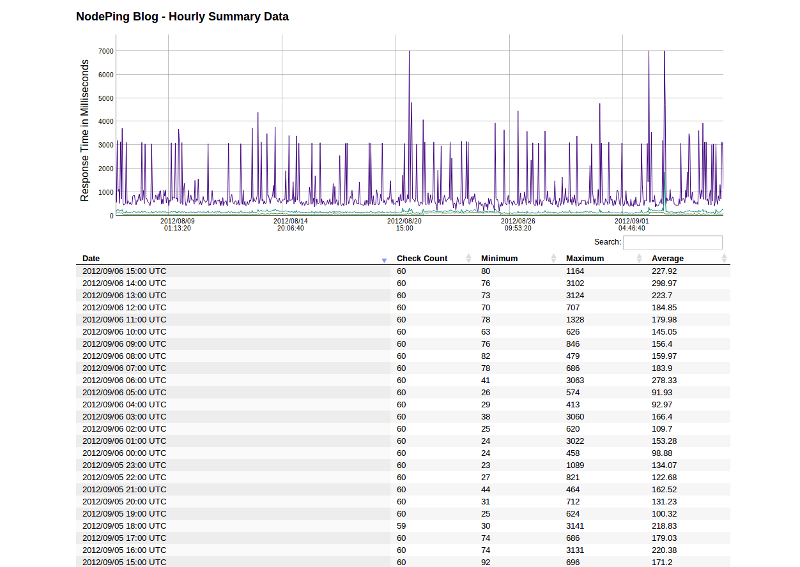
NodePing Monitoring Results Summary ReportWe have implemented a new report to help with this task. The Performance Summary report shows the minimum, maximum, and average response time for a site over an hour. By default, the report shows the last 31 days of performance data. As with the results report, you can change the number of results shown by editing the number on the report’s URL.

Of course, this isn’t limited to just web site performance. This report is available for all monitoring on NodePing, so you can see the same thing for ping results, ssh checks, email checks, and the whole range of other service monitoring we provide. In particular, this type of information is useful in ping tests to routers to watch connectivity performance over time.

We have also adjusted the way our “Public” reports feature works. The summary and results reports are now available if you are logged in to your NodePing account, even if the “Public” access is turned off. The “Public” toggle still controls whether the report is visible to visitors who are not logged in. We also changed the URL’s to better reflect that it is the same report with a different format. The results reports are now all at /reports/results/ (although the old URL’s will continue to work). You can retrieve the data in JSON or CSV format by adding ?format=csv or ?format=json to the URL. For CSV output, you can add a file name to the URL as well for convenience (so the URL would end in /filename.csv?format=csv). Documentation can be found in our reports documentation.

We are continuing to work on improving and expanding our reports. Please let us know what you think, and what you want to be able to see from the monitoring reports. Our continuing goal is to make NodePing not only the most cost effective, but also the most useful monitoring service anywhere.

Twitter Notifications

NodePing is happy to announce our newest notification method – twitter direct messages.  The ability to receive a twitter direct message is a great addition to our current notification system that already includes unlimited email, international SMS, and voice calls.

Twitter notifications are in testing at this point.  They are available on all accounts so please do kick the tires and let us know how things work for you at support@nodeping.com.

You’ll need to follow @NodePing in order to get direct message alerts.  Then add your twitter handle in your contact record and in your check’s notification section and we’ll send you a private and discrete ‘direct message’ (not an embarrassing public tweet) when that check goes down and again when it comes back up.

Let us know in the comments how this new notification type is working for you and what you’d like to see added next – instant message (IM), HTTP POST to url, carrier pigeon, etc?

Monitor Streaming Audio

We’re happy to introduce our new audio check type.  Now NodePing can monitor HTTP streaming audio servers and notify you via email, SMS, and even voice alerts when your audio streams go offline.

The new audio check is available now and can be used to watch HTTP streaming audio services like ICEcast and SHOUTcast servers.  Set the target of the check to the URL specified inside your pls file.  If your pls file looks like:

NumberOfEntries=1
File1=http://example.com:8002/

Set the check target to “http://example.com:8002/“.  The check briefly connects to the stream and reads the headers returned to determine if the audio steam is up or down.

Many thanks to all who gave their “+1” to this new check type.  Your feedback and suggestions help us prioritize which enhancements and new check types our development team works on. If you’ve got a need for a specific check or an enhancement to an existing check, please let us know in the comments below or email us at support@nodeping.com.

Monitoring password protected websites

Some of our customers have asked us to add basic authentication to our HTTP checks. They want to be able to check the availability of web pages that are protected from public access by a login. So, we have enhanced our HTTP and HTTP Content checks to support basic authentication.

This means that when you set up HTTP or HTTP Content checks in NodePing’s website monitoring service, you can now include a username and password in the URL. The format is username:password@host. We already supported both http and https requests and arbitrary ports in the URL. The following URL examples are all in a valid format for NodePing HTTP and HTTP Content checks (although these are fictitious, don’t actually use these URL’s in your checks), with this enhancement rounding out the list:

People who use this feature should be aware that HTTP basic authentication is not secure, which is one of the reasons we had not included it until now. This has required a small change to our Terms of Service to point out that we aren’t responsible for confidential information that is included in checks such as this. If you choose to include a username and password in your checks, you should take normal precautions to protect your data, including making sure that the login used for the checks is limited to no more access than is needed for the check, and avoid reusing passwords.

If you have any questions about basic authentication in HTTP or HTTP content checks, or about any aspect of our website monitoring, please don’t hesitate to ask us by emailing info@nodeping.com.

DNS Monitoring for Both Sides

DNS monitoring, like a coin, has two sides: “What does my DNS server say?” and “What does ‘public’ DNS say?”  With NodePing server monitoring, you can ask both questions.

Our DNS check allows you to send a query of a specific type to your DNS server (or a public DNS server) and test the response against a string you define.  For example, you can verify that your website domain resolves to your web server’s static IP address and have NodePing send you an email or SMS alert when either the server or the response fails.

DNS queries can be made for the following types and the response verified:

  • A
  • CNAME
  • MX
  • NS
  • PTR
  • SOA
  • TXT

You can find more info on the DNS checks and our other check types in our documentation.

If you don’t have a NodePing account yet, try out our new DNS monitoring checks for free with a 15-day trial.

6 Sources of Residual Income for the Web Developer

Most web developers I know are hired for site creation, or re-creation and when the job is done, that’s the end of the revenue from that client until something is broken or some other change needs to happen. But with a little extra effort on your part, you can transition a ‘project’ client into residual income. Not only will this keep a steady flow of cash coming in, but you’ll be able to more easily maintain those valuable relationships with your clients so when the next site or re-design happens, you’ll be the one they call.

Consider adding or packaging a few of the following ‘services’ with your development pitch.

  1. Hosting
    Chances are, you’re already doing some of this. The ability to hand over a turn-key website solution makes it easy to add the ‘web hosting’ line item to your bill. Given the low cost of shared hosting like Bluehost or  HostGator, you can easily charge a modest monthly hosting fee and make a nice margin on it. If you don’t ‘do’ hosting – sign up as an affiliate on a hosting company you recommend. Affiliate programs typically give you a commission for sending them customers. It’s easy to do and doesn’t cost anything. Heck, the two links in this paragraph are affiliate links – so go sign up! <grin>
  2. Monitoring
    If the site is worth developing and hosting, it’s worth keeping an eye on. No matter who the host is, your client (and you, if you’re hosting it – see #1) should be the first ones to know if it has gone down. Get yourself a website monitoring account at NodePing (come on, you saw that plug coming a mile away). For only $10/month, you can set up 1000 URLs to keep an eye on. Resell some of those checks to your client – charge them whatever you think is fair and they’re willing to pay. Set your client up as a ‘Notifications Only‘ contact and they’ll get an email or SMS whenever the site goes offline – and when it comes back up too. With NodePing’s new public reports, you can create a URL on your branded website and iframe in the public report so your client can bask in the glow of their uptime graph. If you don’t know how to iframe one page into another, you’re not the target audience of this blog post – but just in case, here’s a link on how to iframe.
  3. SSL Certificates
    If your client’s site has a login form, they’ll need an SSL certificate. The ease of wireless ‘sidejacking’ using Firesheep and similar tools, you should know better than to have a non-SSL login form. Like hosting you can either resell SSL certificates directly or sign up to be an affiliate and earn a commission (usually a percentage) of your client’s spending. Unlike hosting, it takes quite a bit more hoop jumping to become a reseller but with the price of certs and the fact that they need to be re-issued on a regular basis it’s worth the effort.
  4. Payment Processing
    The least fun part of developing ecommerce solutions is the payment gateway integration. Typical reseller/affiliate programs with payment gateways include a percentage of the setup fee, a percentage of monthly fee, and even a per-transaction cut. While Braintree is definitely our preferred gateway here at NodePing (great API and low costs), they unfortunately don’t have a reseller/affiliate program so you may want to stick with some of the old guards like Authorize.net.
  5. Backups
    Your client will need ‘offsite’ backups of their sites and databases. Most of the cheaper hosting companies don’t provide adequate backups, which provides you with an opportunity to sell a much-needed service to your client. Drive Headquarters has a generous referral program and offers both client and server backup capabilities that are very script-able. Just be sure you know how to restore the site from those backups.
  6. Timeshare in Vegas
    OK, this one is just for laughs.  Timeshares are like boats – everybody I’ve ever known who bought one, has also sold one.

If you started adding auxillary services like those above, you could easily see a $100/month/client jump in revenue for just a wee bit of your time in administrating… multiply that times your current client base and you just got a nice raise!  Felicidades!

More importantly, providing extra services will help you maintain a relationship with your client, so the next time they need a $7k makeover on their site, yours is the only bid they’ll consider… after all, you’re doing so much for them already.

So there are 5 ways you can leverage your web development relationship with your client into a bit of residual income.  It’s by no means an exhaustive list.  If you’ve got better channels for residual income or maybe just excellent suggestions for the resell-able or referr-able services listed above, share it with us in the comments.

Public status reports of monitoring results

One of the features that we get asked about fairly often is public reports for monitoring results. It has been on our todo list from the start, and starting today they are available.

Of course, not every check on your list is something you want out in public. So this feature can be turned on individually for each check. Each check that you enable for public reports will have its own URL.

We’ve intentionally made these reports fairly plain, without much branding. This makes them suitable for framing or other methods you could use to embed them in your own site.

These reports will see further enhancements in the near future. As always your feedback is welcome.