Monitoring results now available in JSON and CSV formats

Many of our customers monitor their own customers’ websites, or they monitor services about which they have to periodically report availability and incident statistics. Many of them would like to include status information in their own dash boards or integrate results with other data in reports. All of that calls for the data to be available in formats that can be easily used by scripts, or easily imported into spreadsheets.

NodePing has now added the ability to retrieve monitoring results in JSON and CSV format. JSON is ideal for scripting situations, such as creating your own dashboards or views of the data. CSV is great for loading the results data into your spreadsheets for analysis or creating reports for customers or management.

Both of these formats are available as extensions to our public reporting feature, which we added a while back. When you turn on public reporting, you are given a UUID that identifies that check. The same UUID can be used to access the data as a public report (you need to know the UUID, which gives you some control over who sees it, but does not require a login), as JSON output, or as a CSV download.

You can read more about these features and see some sample URLs on our Reporting page in the NodePing Documentation.
Monitoring password protected websites

Some of our customers have asked us to add basic authentication to our HTTP checks. They want to be able to check the availability of web pages that are protected from public access by a login. So, we have enhanced our HTTP and HTTP Content checks to support basic authentication.

This means that when you set up HTTP or HTTP Content checks in NodePing’s website monitoring service, you can now include a username and password in the URL. The format is username:password@host. We already supported both http and https requests and arbitrary ports in the URL. The following URL examples are all in a valid format for NodePing HTTP and HTTP Content checks (although these are fictitious, don’t actually use these URL’s in your checks), with this enhancement rounding out the list:

People who use this feature should be aware that HTTP basic authentication is not secure, which is one of the reasons we had not included it until now. This has required a small change to our Terms of Service to point out that we aren’t responsible for confidential information that is included in checks such as this. If you choose to include a username and password in your checks, you should take normal precautions to protect your data, including making sure that the login used for the checks is limited to no more access than is needed for the check, and avoid reusing passwords.

If you have any questions about basic authentication in HTTP or HTTP content checks, or about any aspect of our website monitoring, please don’t hesitate to ask us by emailing info@nodeping.com.

Server Monitoring from Europe

NodePing is happy to announce we’ve added a new region to our check locations. You can now choose to run your checks from our North American or new European regions… or both!

Website Monitoring

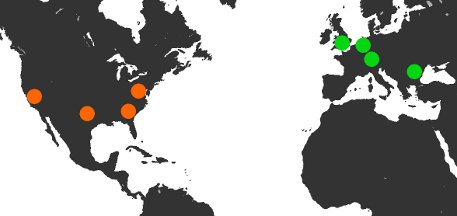
We’ve heard from many of our customers with a presence in Europe that a check location on that side of the pond would be a huge benefit. Thanks to our great providers, IntroVPS and RobHost, we added 4 new probe servers in the following locations:

  • London, England
  • Amsterdam, Netherlands
  • Falkenstein, Germany
  • Bucharest, Romania
Check out our FAQ for ip addresses and more information on our check locations.

We’ve also introduced the idea of a ‘default region‘ for your NodePing account. For new customers, you’ll set your default region when you sign up. Current customers have their default region set to ‘North America’. The default region can be changed in the ‘Scheduling‘ tab. When you create checks, they will be automatically run from your default region. You may, of course, decide to run any check from any region (including multiple regions and ‘worldwide’) by simply choosing the desired region from the check configuration when you create it. You can also change an existing check by selecting a different region in the check configuration at any time.

When you assign your checks to a region, they will be run from a random server in that region. If an ‘up/down’ event is detected, NodePing will immediately and automatically recheck from other servers in that same region. The number of rechecks is based on your configuration of the check – the default is 2 rechecks. After verifying the ‘up/down’ status on other servers in the same region, we’ll send out your configured email and SMS notifications.

Everything is included with NodePing so the new European region checking is already part of your flat-rate $10 a month subscription which includes your 1000 site/server checks, unlimited logins, contacts, contact groups, emails and international SMS. If you’re not already a customer, sign up for your free 15-day trial.

We’re already planning to add even more check regions to NodePing – Oceania maybe? South America? East Asia? Let us know in the comments what new region you’d like to see added next.

Contact Groups added to NodePing

We have been getting a lot of great feedback and suggestions from our users over the months since we launched the NodePing monitoring service. One feature that many people have asked for is the ability to group contacts and assign notifications to groups of contacts rather than just to individuals. Today we’re excited to announce that we’ve added Contact Groups to the service.

You can now create a Group, assign individual addresses or phone numbers to each contact group, and then set the Group to receive notifications for individual checks. So, for example, you could create a Developers group and a Systems group and have each assigned to different sites or servers you are monitoring. Then if the makeup of that part of your team changes you can change who belongs to the group without having to change each of the notifications.

One way we use this feature in the NodePing team is to assign SMS numbers to a group called SMS. Then we can easily set notifications to all of our phones together. For us, SMS notifications generally mean “Do something about this now!” and it makes it easy to assign key services to this notifications contact group. You could also use it to group all of a person’s contact methods easily for notifications that should get to them wherever they are. So for example you could create a “Shawn” group and include all of Shawn’s email addresses and phone numbers in that group. Then notifications will automatically be sent to all of his addresses.

As with contacts, there is no limit on the number of contact groups you can use in NodePing. You can mix and match contact methods in all kinds of ways, to suit your particular needs. We’re happy to now get to use this feature ourselves, and we hope it will further enhance the usefulness of our service to you as well.

There are a few smaller enhancements and adjustments in the release today as well, and we have more coming. Thank you to everybody who has chosen NodePing for their server and website monitoring. Thank you also to everybody who has given us feedback and suggestions. Please keep them coming!

DNS Monitoring for Both Sides

DNS monitoring, like a coin, has two sides: “What does my DNS server say?” and “What does ‘public’ DNS say?”  With NodePing server monitoring, you can ask both questions.

Our DNS check allows you to send a query of a specific type to your DNS server (or a public DNS server) and test the response against a string you define.  For example, you can verify that your website domain resolves to your web server’s static IP address and have NodePing send you an email or SMS alert when either the server or the response fails.

DNS queries can be made for the following types and the response verified:

  • A
  • CNAME
  • MX
  • NS
  • PTR
  • SOA
  • TXT

You can find more info on the DNS checks and our other check types in our documentation.

If you don’t have a NodePing account yet, try out our new DNS monitoring checks for free with a 15-day trial.

Now with Unlimited International SMS

Until today, NodePing  offered SMS notifications only to US-based numbers. But do not despair, our friends across the great ponds, we’re happy to announce that we’ve added unlimited international SMS notifications to our server monitoring service. Just add your mobile number to your contact record in plus format (example for UK ‘+445555555555’), and then set it as the notification number in your checks. As always, here at NodePing, it doesn’t cost any extra.  Same great service, same great price – you’ve leveled up!

Globally, mobile networks have a lot of variability and it is possible that some carriers won’t work with our SMS initially. If that’s the case with your carrier please let us know and we’ll do what we can to resolve it.

Give us a digital high-five in the comments if you’re glad to see international SMS added to NodePing!

Adding Notification Only Contacts

NodePing’s monitoring service is gaining popularity with companies that in turn provide online services such as hosting and network services to small businesses. NodePing works really well for these companies, because they can monitor a large number of their own customers sites and networks at one incredibly low cost. In fact, the cost of doing the same thing with most other services would run them several times as much. This enables our customers to bundle our monitoring as a part of the services that they can provide to their own customers in a very economical way, increasing their service value at low cost. That’s a win for everybody. This group of our customers have been asking us to add features to our service that makes this work even better for them, and we have been working to do just that.

The other day we added public reports to our list of features. Today we’re adding the ability to create contacts that receive notifications, but do not have a login to the NodePing app. Together, these features allow a provider to assign their customers to receive notifications and see uptime reports without access to the providers NodePing account information.

Seeing our monitoring services in use by other service providers to enhance their own offerings is exciting for us, and we plan to continue to add enhancements for this audience. As always, your feedback is welcome.

Public status reports of monitoring results

One of the features that we get asked about fairly often is public reports for monitoring results. It has been on our todo list from the start, and starting today they are available.

Of course, not every check on your list is something you want out in public. So this feature can be turned on individually for each check. Each check that you enable for public reports will have its own URL.

We’ve intentionally made these reports fairly plain, without much branding. This makes them suitable for framing or other methods you could use to embed them in your own site.

These reports will see further enhancements in the near future. As always your feedback is welcome.

US SMS? Yeah, we got that…

You asked for it…

For our US customers NodePing now offers unlimited SMS as part of the $10/month plan.  And you thought we couldn’t pack any more value in there!

All you need to do is add your 10-digit phone number to your contact record and to your check notifications and those important UP/DOWN messages will flow directly to your phone.

For customers outside the US, we’re working on direct SMS integration and hope to implement it in the near future.  Until then, please continue to use the email-to-SMS gateway addresses provided by your mobile carrier.  If your mobile operator isn’t listed at the link provided, please contact them directly and ask what your email-to-SMS address is.

Multi-site checks added to NodePing

This week we’ve launched pinghosts in two additional locations with automatic rechecking across locations. So if the New Jersey pinghost reports a monitored site is down, we now automatically recheck it from Texas and California before we send notifications.

How many times we do this depends on your “Sensitivity” setting for the check. The default setting of High rechecks once from each of the other two locations. These rechecks take a few seconds each, and the notification will be sent off in around 30 seconds. A setting of “Very Low” rechecks the service ten times, and with the extra rechecking the notification gets out in around 2 minutes. A setting of “Very High” doesn’t do a recheck at all, so if any check shows the service is not responding as expected we send the notice immediately.

This addition of the multi-site rechecks is one of the features we get asked about most often, and we’re very happy to get it rolled out to our production service. We’d love to hear from you about additional features that you’d like to see in our service.