Public Status Pages

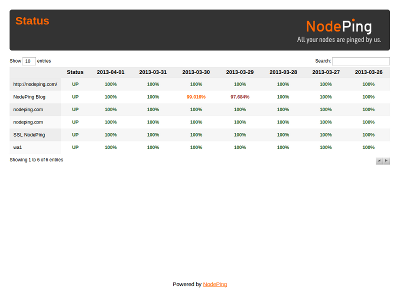
One of the frequent requests we get is for a public status page that lists the status of several server monitoring checks in one place. There is a lot to this particular feature, but we’re pleased to announce that the first version of this feature is now available on NodePing.

NodePing Status ReportThe status report allows you to select any of your active checks for listing on the status page. Any number of checks can be included. Just go in to the Reporting tab under Account Settings and select the checks you want to have displayed. The tab also shows the URL for your status report page.

The report has a “title” field, which is displayed at the top of the page. This field supports HTML, so you can add tags to style the look of the top of the page. That includes using an img tag to show your logo or other branding type information at the top of the page. For examples, you can look at https://nodeping.com/reports/status/MTSL1PQUZC and https://nodeping.com/reports/status/P9H0LI94W7. Script tags and other cross site scripting will be filtered. Provider accounts have additional control over the look of the page using the site branding features.

We didn’t want to just start publishing information without allowing people to opt-in to this featuer, so by default this report is not enabled. Enabling it is just a few clicks.

There are a number of additional features that we plan to add to this report, including more customization, links to individual check result pages, and custom URLs. In the meantime, feedback and suggestions are always welcome at support@nodeping.com.

IP Address Changes – [TX and NJ]

Our probe servers in Texas [TX] and New Jersey [NJ] will be changing IP addresses on 2013/04/02:
TX will change from 69.164.201.21 to 204.11.60.100
NJ will change from 96.126.109.97 to 108.61.56.241

No data loss is expected. There may be a few minute delay when any of your checks running on the current probe servers are moved to the new ones.
We apologize for any inconvenience.
Please adjust your firewalls appropriately so your checks are not blocked.

A current and updated list of all the IP addresses for our probe servers can be found in the FAQ.

[UPDATE – 2013-04-02] – The change is complete.

Minor API enhancements added today

We have a couple of updates to our API.

You can obtain the current status of your checks using /api/1/results/current. This returns a list of checks that currently have an “event,” which means that the check is currently disabled or is listed as “down.” The information returned will include a timestamp when the event started. Checks not listed in the results for this call are currently “up.”

We’re also adding a couple of convenience tweaks. When you are getting a list of checks, you can add a “current” parameter in order to have any current events added to the check information. This basically mixes the information from the “current” call mentioned above in with the list of checks.

Additionally, when you are getting a single check, you can add a “lastresult” parameter to the request and get the most recent result for that check along with the check information.

All three of these changes are included in our API Reference documenation. Hopefully these minor enhancements will be of help. Feedback is welcome here or at support@nodeping.com.

Sendgrid’s outage impacted our notification systems

Our notification systems use Sendgrid for email delivery. Overall, Sendgrid has been very reliable and a solid service provider. Today Sendgrid had a fairly significant outage, and that has impacted the timely delivery of some of our email notifications. Obviously for a service like ours this is a big deal.

We are in the process of reviewing our notifications infrastructure to see how our failover systems can be improved to make sure our notifications always get out in a timely fashion. Our apologies to our users who were impacted by this problem.

If you have any questions about this issue, please feel free to email us at support@nodeping.com.

Webhooks for Business Plan Customers

At NodePing we are constantly striving to provide the best server monitoring service at absolutely the best price we can. Our goal is to be as useful as we can to meet your day to day monitoring needs for both web and server monitoring, at a price that removes all barriers for best practice monitoring for every service, everywhere.

In line with that goal, today we are changing the Business plan to add unlimited webhook notifications. Previously those were only available in the Provider plan.

Webhooks allow you to trigger actions on other sites based on events from NodePing’s monitoring system. This allows you to automate actions on your servers when a web site goes up or down. Common uses include changing DNS settings when a server goes offline and restarting a database when it fails.

Our hope is that including webhooks in the Business plan will make NodePing’s most popular plan even more useful for businesses the world over. A lot of what we do is based on feedback, so please continue to let us know how we can continue to make our service fit your needs even better.

HTTP Parse Check – Monitor Anything!

Most of the checks that we have released for NodePing to date have monitored specific Internet-based services. These are very useful, and they are the bread and butter of traditional web site and server monitoring services. Today we’re really excited to announce the release of our “Monitor Anything” check. You can use it to monitor… well, just about about anything.

The new check is the HTTP Parse check. It connects to a remote HTTP service and parses the response for specific fields and values. The values are then stored in the check results for reports. If any of the values are outside of your configured ranges, it triggers a notification via email, SMS, twitter, voice call, or webhook.

The HTTP Parse check can look for named fields in text or a JSON response. For example, if the check is configured to look for a field named “llamas” and the response contains llamas: 34 then the system will store 34 as the value, which will be displayed on reports and charts.

Similarly, the response could be in JSON format. For example, the JSON could be something like this: {"animals": {llamas": 34}} Configuring the check to look for animals.llamas will store 34 in the check results. The check can handle multiple fields, as long as they are all accessible from one request to a URL, and it can pull values from the middle of a larger response.

What could this check be used for? Anything that is accessible by an HTTP request that returns a field with a numeric value. Since it is parsing the response for the field name and value, it can be embedded in other data. This means that any JSON API or data service on the Internet is potentially a target for this.

Sample Server Load OutputOur use of this check at NodePing is to monitor server health. As you can imagine, running a service like NodePing means we have a number of servers all over the place. We use this check to monitor server load, free memory and disk space on a number of our servers.

There are many ways to generate the system information from a host so it can be used for this check. Some of the ones we’ve tried include Linfo and phpSysInfo. We wanted a similar tool written in Node.js, so we wrote npsystats, which is what we now use for our systems. We’ll have more to say about npsystats in the near future. There are a number of other similar tools out there, such as Ohai in Ruby. The HTTP Parse check is capable of working well with most of them.

For example, we have a check on a web server that monitors server load. npsystats returns the following json in response to the check’s HTTP GET request:
{"load":{"1min":1.86376953125,"5min":0.9501953125,"10min":0.64404296875}}
The check is set to watch three fields: load.1min, load.5min, load.10min, with a range of 0 to 8 (it could be different for each field, but it doesn’t have to be). So if the load on this server goes over 8, I will get an email. I also can access a graph showing the 1, 5, and 10 minute load for this server.

More information can be found in our documentation for the HTTP Parse Check. We think this makes NodePing an even more awesome piece of your system monitoring and automation toolkit, particularly when tied to judicious use of notifications and webhooks. If you don’t have an account on NodePing yet, try it out with our 15 day free trial.

Email monitoring done right

For several years before starting NodePing I worked in a number of different roles in IT, including system administration, project management, infrastructure and network management, and development. A sizable chunk of that time was spent at an organization that ran email servers in a number of different countries scattered around the world. Making sure that all of those email systems were working properly and generating useful reporting was a huge challenge, and involved a lot of repetitive manual steps.

Availability report outputNodePing’s monitoring services were largely motivated by the desire to make widespread monitoring of web sites and other Internet accessible services as simple and automatic as possible. One of the reasons I’m so excited about our suite of email monitoring checks is that I know from personal experience how important these tools are, both from a sys admin’s point of view as well as from technical management roles.

The core of this set of tools is SMTP monitoring. This check has several options that allow you to check the remote SMTP server in a variety of ways. At its most basic, it can be used to check that the server is operating and answering to SMTP connections and is accessible. It can also watch the SSL/TLS certificates, and notify you in advance of when certificates will expire. The check also can be used to monitor if the SMTP server accepts or denies specific email addresses, which can be used for open relay monitoring. Authentication verification can make sure that the server is logging people in properly. This is particularly important when email servers are integrated with separate directory services, such as an LDAP service or Active Directory.

SMTP server monitoring should also be paired with RBL monitoring. This checks the server’s address against a number of different RBL services, and can notify you if the server has been blacklisted. Any experienced email administrator knows that staying off of these lists is critically important, and it is possible to get on a black list without doing anything outside of normal business practices. When it happens you need to know quickly so you can remedy or clarify the situation and get off of the black list before it negatively impacts business.

The IMAP and POP checks go hand in hand with the SMTP check to ensure that your customers and employees can retrieve mail from their inboxes. Like the SMTP check, these checks not only monitor that the server is accepting connections, but can verify authentication and warn you in advance if an SSL certificate is nearing expiration.

The final piece of the email service monitoring tool set is monitoring the web interface. Here NodePing’s HTTP Content check can be used to make sure that the service is responding with the proper web page, and the SSL check can verify that the web interface’s SSL certificate is in place and working properly, as well as warn of a nearing expiration date.

These checks together provide a full complement of tools for monitoring email services. For most systems, we’d suggest a full set of checks:

  • The SMTP service is operating properly on port 25, accept a STARTTLS command, accepts authentication, and accepts a given address for relay from an authenticated user. All of this, with verification of the TLS certificate, can be done with one check.
  • The SMTP service is listening and accepting SSL based connections on port 587.
  • The SMTP service rejects open relay requests.
  • The SMTP service accepts a local address from non-authenticated hosts.
  • The server is not on any RBL’s.
  • The IMAP server is operating properly on port 143 and authenticating properly
  • The IMAP server is operating properly on port 993 and the SSL certificate is good
  • The POP server is operating properly on port 110 and authenticating properly
  • The POP server is operating properly on port 995 and the SSL certificate is good
  • The web interface is operating properly on port 80 (if that is supported)
  • The web interface is operating properly on port 443 and the certificate is good.

This is a long way from a check that just monitors if a port is listening somewhere. It is the full set of checks that together help to ensure a healthy email system. We continue to extend our monitoring service and make our checks smarter, with the goal to take as much of the manual busy work out of the hands of busy administrators and allow them to focus on tasks that use their actual skills.

If you are responsible for email servers and haven’t added NodePing’s monitoring to your tool set yet, sign up for our free trial and give a try!

Don’t let your certificate expirations catch you offguard

Microsoft’s recent slipup with a certificate that caused outages for the Azure service is a reminder for the rest of us to make sure we are keeping a close eye on certificate expirations. Having a certificate expire on you makes you company look really inept, but in practice keeping track of certificates and when they expire can be a pain if you are trying to do it manually. A system that monitors certificates and reminds you before they will expire can be an excellent way to avoid having this happen to you, and is much easier than tracking them in a spreadsheet or sticky notes.

NodePing provides a few different ways to keep ahead of certificate expirations. For web servers, we have an SSL Check specifically designed to check the validity of SSL certificates and warn you a set number of days before they expire. You can set the number of days to anything that is useful for you. We typically suggest a couple of weeks in advance of the expiration.

Certificate expirations can also hit other types of services as well. Our email checks (SMTP, POP, and IMAP) can verify the SSL/TLS certificates used by each of these servers. Similar to the SSL check for web services, these checks verify that the SSL certificate is valid and working, and also can be set to warn you a certain number of days before they expire.

Tracking your certificates can be a pain, but it doesn’t have to be. Using an automated monitoring system like NodePing for SSL Certificate monitoring can make the task easy and painless, and let you focus on more interesting things.

IP Address Change – [NL]

Our probe server in the Netherlands will be changing IP addresses on 2013/01/18:
From 46.249.62.70 to 46.249.33.15

We apologize for any inconvenience. It’s a forced server move from our host there.

Please adjust your firewalls appropriately so your checks are not blocked.

[UPDATE – 2013-01-18] – The change is complete.

SIP Monitoring

If you run SIP servers, you’ll be pleased as punch to know we’ve just released a new SIP server monitoring check just for you. Now you can be alerted if your SIP server goes offline or isn’t responding to SIP commands.

SIP stands for “Session Initiation Protocol,” and refers to a signaling protocol that can run over TCP or UDP and is commonly used for voice and video communications. SIP servers are often the connection points for VOIP calls.

The check does not initiate a call, but rather tests that the the server accepts a SIP connection by sending the OPTIONS command and watching for the response. Even if your server does not support the OPTIONS command and returns an error, this indicates that the server is up and operating, so the check succeeds. You can find more information about this check in our SIP Check documentation.

This new SIP check is available today for all NodePing accounts. If you don’t have a server monitoring account with NodePing yet, head on over and sign up for our free 15-day trial.