NodePing mobile push notifications to wake you up!

We’re pleased to announce another new notification type for NodePing server monitoring. You can now receive persistent push notifications through Pushover on your iOS or Android device.

Once configured, each ‘down’ event for your check will push an ’emergency’ notification to your device and automatically re-alert every 30 seconds until it is acknowledged, up to 5 minutes.  Try sleeping through that!

Pushover notifications are faster and more reliable than SMS and are currently the only NodePing notification type that will persistently re-alert you when a check fails. Please consider switching your SMS alerts to Pushover alerts. It will also help us keep NodePing prices down as Pushover alerts are significantly cheaper than international SMS.

Once installed, simply add your Pushover ‘user key’ as a ‘Pushover’ notification type in your contact record and select that key when creating or editing a NodePing check.

For those who may be interested in viewing your check status in a native iOS app, one of our customers has created HostCheck using our API.

Let us know in the comments what NodePing feature you’ve been itching to see.

How to integrate PagerDuty into NodePing

Many of our customers are also big PagerDuty fans. What’s not to like! PagerDuty offers great escalation and on-call hand-off capabilities as well as flexible voice, sms, and even pajama alerts.

To make it easier for you to integrate your already existing PagerDuty workflow, we’ve added a new contact notification type to NodePing. The ‘PagerDuty’ type accepts a ‘Service API Key’. You can find information on how to set up a PagerDuty generic API service at their support site.

Our system will send a ‘trigger’ event on each failure and a ‘resolve’ event on each recovery. Add an entry in your contact record by specifying your PagerDuty ‘Service API Key’ (they kind of look like a big random string “47b3a13848514c3fa3def842464eeaa8”) and selecting ‘PagerDuty’ in the notification type drop down. Then specify that contact when you edit or create your NodePing checks.

pagerduty

You can specify as many different PagerDuty contacts as you like. This allows you to use multiple ‘Services’ with NodePing and have full control of your PagerDuty escalations and notifications.

We strive to bring you the best solutions for your monitoring needs. We’ve set our eyes on Android and iOS push notifications next so follow this blog for that notification. We’d also love to hear from you. What notification types or other features would you like to see in NodePing?

If you’re not a NodePing customer yet, you can sign up for a free 15-day trial and kick the tires for yourself. We’re confident you’ll like what you find.

Adding Probes to NAM Region and IP Changes [LD] and [CA]

We’re excited to announce the addition of two more probe servers in the North America (NAM) region. They will be brought online 2014-01-20.

Denver, Colorado (US) – CO (162.211.64.212)
Chicago, Illinois (US) – IL (162.211.66.130)

Additionally, the IP address for the current probes listed below will also be changing on  2014-01-20.

LD will change from 5.2.16.253 to 78.157.217.106
CA will change from 98.143.145.67 to 23.94.101.96

Please update your firewalls appropriately.

We continue to strive to bring you the most reliable and economical server monitoring anywhere.

A current and updated list of all the IP addresses for our probe servers can be found in the FAQ.

[UPDATE – 2014-01-20 10:29GMT-7] – All new probes and IP changes have completed.

New East Asia/Oceania Region

We’re excited to announce we’re adding a new check region and probe servers in East Asia/Oceania to the NodePing server monitoring service.

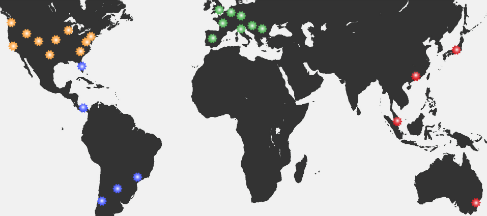
The new region will be brought online and available for selection starting January 6, 2014. With this new addition, NodePing now has three distinct check regions, North America (NAM), Europe (EUR), and East Asia/Oceania (EAO).
NodePing Regions
The new probe servers are located in:

  • Sydney, Australia [AU]
  • Singapore [SG]
  • Hong Kong [HK]
  • Tokyo, Japan [JP]

IP addresses for the new probe servers can be found in the FAQ. Any questions can be directed at support(at)nodeping.com

[UPDATE – 2014-01-06 08:52GMT-7] – All four new probe servers in the EAO region are online and operational.


IP Address Changes – [LD]

Our probe server in London, United Kingdom [LD] will be changing IP addresses on 2013/12/09:
LD will change from 109.73.168.10 to 5.2.16.253.

No data loss is expected. We apologize for any inconvenience.
Please adjust your firewalls appropriately so your checks are not blocked.

A current and updated list of all the IP addresses for our probe servers can be found in the FAQ.

[UPDATE – 2013-12-09 13:29GMT-7] – LD IP address change complete

IP Address Changes – [CA]

Our probe server in California [CA] will be changing IP addresses on 2013/11/21:
CA will change from 173.254.226.131 to 98.143.145.67

No data loss is expected. We apologize for any inconvenience.
Please adjust your firewalls appropriately so your checks are not blocked.

A current and updated list of all the IP addresses for our probe servers can be found in the FAQ.

[UPDATE – 2013-11-21 20:26GMT-6] – CA IP address change complete

Adding Probe to EUR Region – CZ

As more of you are finding NodePing a great value for server monitoring, we’re needing to expand. Growth is good!

We’re adding an additional probe server to our European region on 2013-11-06.

Zlin, Czech Republic (CZ) – CZ (50.7.228.37)

Please update your firewalls appropriately.

We’d love to hear what locations or regions you’d like to see NodePing probe servers. Leave a comment below.

[UPDATE – 2013-11-06 14:33GMT-6] – Probe server is up and running

IP Address Changes – [NJ, CA, LD, NL, DE]

Our probe servers in the following locations will be changing IP addresses on 2013/10/01:
NJ will change from 108.61.56.241 to 192.3.25.36
CA will change from 173.255.243.111 to 173.254.226.131
LD will change from 89.32.145.126 to 109.73.168.10
NL will change from 46.249.33.15 to 176.56.238.119
DE will change from 78.47.40.108 to 130.255.191.151

No data loss is expected. There may be a few minute delay when any of your checks running on the current probe servers are moved to the new ones.

We apologize for any inconvenience.

Please adjust your firewalls appropriately so your checks do not fail because the probe IP addresses are blocked.

An always current and updated list of all the IP addresses for our probe servers can be found in the FAQ.

[UPDATE – 2013-10-01 20:12GMT-6] – All IP changes have completed

HTTP Advanced Check

Our HTTP checks for website monitoring at NodePing already include our standard HTTP Check, the HTTP Content Check that lets you verify that specific content is present or is not present in the page, and the HTTP Parse Check that allows you to track and alert on arbitrary data points in the response. Today we’re excited to announce that we’re adding the HTTP Advanced Check to our HTTP line up.

The new HTTP Advanced Check adds the following capabilities:

  • simulate a form POST to your web site and verify the expected response
  • check for arbitrary HTTP response status codes for custom API servers
  • send HTTP headers
  • verify specific HTTP headers are being received
  • send PUT, DELETE, HEAD, TRACE, or CONNECT methods

This will allow you to do more in-depth monitoring of your HTTP services. Use cases may include:

  • POST incorrect credentials to log in pages and verify the HTTP status code of 403 is returned.
  • Send mobile browser User-Agent headers and use the content checking to verify the mobile version of your site is being shown
  • Verify a PDF link is returning a PDF file by checking the return header for the correct ‘Content-Type’:’application/pdf’
  • Verify your redirect script is returning a 302 status code and not an error.

Additional information about this new check type can be found in our documentation.

The HTTP Advanced check is now available on all NodePing accounts. All accounts also include unlimited notifications, including international SMS. If you don’t have a NodePing account yet, please sign up for our free 15-day free trial.

Public status reports updated

We announced the initial release of our public status pages for our web site and server monitoring service a couple of weeks ago. These pages allow you to have a public status page for all of your servers and websites in one place. Since then, we’ve worked to add some additional enhancements that we think will be particularly useful.

First, we’ve added custom domains. This allows you to set up a URL such as https://status.example.com as your public status page. Just add a cname record to your DNS to point the domain to nodeping.com, and add the domain or subdomain to the report settings in your NodePing account (under Account Settings -> Reporting), and the custom URL will be available within 30 seconds or so. Once you have a custom domain set up, all of your public reports are available on that domain.

We’ve also added links to reports on individual check results. Any checks for which you have enabled public reports will include a link on the status page to go to the individual report. At the same time, we tweaked the individual results report so that the long list of results only shows if you click on the “Show Details” button. We got some feedback that the whole list is a little overwhelming, so we’ve made the information still available but not shown by default.

Finally, we’ve made a few cosmetic tweaks to the reports and to the reports settings page.

We have a number of additional features and enhancements we’re planning to add to these reports still, but we hope what we’ve done so far is already useful to everybody. As always, feedback and suggestions are welcome. Let us know what you think at support@nodeping.com, by posting comments here, or by using our Contact Page.