SSL Check Now Supports SNI and UCC Certificates

We’re happy to announce a couple of enhancements to our SSL certificate check. We now support SNI and UCC certificates

SNI (Server Name Indication) passes the hostname to the server when we request the certificate. That allows you to serve multiple SSL certificates on a single IP address.

UCC (Unified Communications Certificates) allow you use one certificate for multiple hostnames. Unlike wildcard certificates, which NodePing has supported from the beginning, UCC certificates can cover multiple hostnames on multiple domains.

As IPV4 addresses keep getting scarcer, the ability to monitor your SNI and UCC certificates for validity and expiration dates will become increasingly more important. NodePing is glad to be able to offer reliable monitoring for these SSL types.

If you’re not already a NodePing customer, please sign up for our free trial and see how SNI and UCC certificate monitoring can be easy and economical.

NodePing site update

We updated the web application that provides the front end to our website and server monitoring service today. Most of the changes to the site are incremental improvements. Most notably, we’ve been working on our billing system to make it more flexible and support tiered billing.

At the same time, we have made a minor adjustment to our Terms of Service. Ironically, the change to our Terms of Service is about changes to the Terms of Service. In light of some recent news stories about other companies, we wanted to make it clear that our ToS can change, but that changes impact you when you have actual notice of the change. We don’t have any intention of sneaking in changes that materially alter what you agreed to when you signed up without giving you notice and a chance to decide if you wish to continue to use the service.

We will continue to work on improving and extending our service. NodePing is already an outstanding monitoring service and an excellent value. We are committed to providing the best monitoring service for the best price. We think we are already doing that, and we plan to make it continually better yet.

Your feedback, as always, is welcome both here in the comments, on our Contact page, or in email to support@nodeping.com.

New Performance Summary Report and Updated Public Reports

Web site developers spend a significant amount of time and effort optimizing the site so that it loads quickly and performs well for their visitors. All of that effort is wasted if the web server performs poorly. One of the key uses for website monitoring is keeping an eye on web server performance to make sure that piece of the visitor’s experience is working optimally.

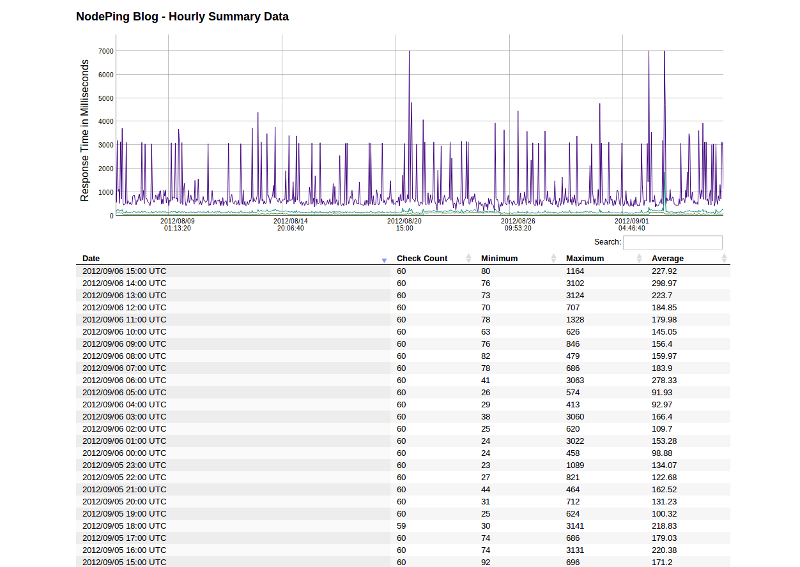
NodePing Monitoring Results Summary ReportWe have implemented a new report to help with this task. The Performance Summary report shows the minimum, maximum, and average response time for a site over an hour. By default, the report shows the last 31 days of performance data. As with the results report, you can change the number of results shown by editing the number on the report’s URL.

Of course, this isn’t limited to just web site performance. This report is available for all monitoring on NodePing, so you can see the same thing for ping results, ssh checks, email checks, and the whole range of other service monitoring we provide. In particular, this type of information is useful in ping tests to routers to watch connectivity performance over time.

We have also adjusted the way our “Public” reports feature works. The summary and results reports are now available if you are logged in to your NodePing account, even if the “Public” access is turned off. The “Public” toggle still controls whether the report is visible to visitors who are not logged in. We also changed the URL’s to better reflect that it is the same report with a different format. The results reports are now all at /reports/results/ (although the old URL’s will continue to work). You can retrieve the data in JSON or CSV format by adding ?format=csv or ?format=json to the URL. For CSV output, you can add a file name to the URL as well for convenience (so the URL would end in /filename.csv?format=csv). Documentation can be found in our reports documentation.

We are continuing to work on improving and expanding our reports. Please let us know what you think, and what you want to be able to see from the monitoring reports. Our continuing goal is to make NodePing not only the most cost effective, but also the most useful monitoring service anywhere.

Twitter Notifications

NodePing is happy to announce our newest notification method – twitter direct messages.  The ability to receive a twitter direct message is a great addition to our current notification system that already includes unlimited email, international SMS, and voice calls.

Twitter notifications are in testing at this point.  They are available on all accounts so please do kick the tires and let us know how things work for you at support@nodeping.com.

You’ll need to follow @NodePing in order to get direct message alerts.  Then add your twitter handle in your contact record and in your check’s notification section and we’ll send you a private and discrete ‘direct message’ (not an embarrassing public tweet) when that check goes down and again when it comes back up.

Let us know in the comments how this new notification type is working for you and what you’d like to see added next – instant message (IM), HTTP POST to url, carrier pigeon, etc?

Monitor Streaming Audio

We’re happy to introduce our new audio check type.  Now NodePing can monitor HTTP streaming audio servers and notify you via email, SMS, and even voice alerts when your audio streams go offline.

The new audio check is available now and can be used to watch HTTP streaming audio services like ICEcast and SHOUTcast servers.  Set the target of the check to the URL specified inside your pls file.  If your pls file looks like:

NumberOfEntries=1
File1=http://example.com:8002/

Set the check target to “http://example.com:8002/“.  The check briefly connects to the stream and reads the headers returned to determine if the audio steam is up or down.

Many thanks to all who gave their “+1” to this new check type.  Your feedback and suggestions help us prioritize which enhancements and new check types our development team works on. If you’ve got a need for a specific check or an enhancement to an existing check, please let us know in the comments below or email us at support@nodeping.com.

Monitoring API, Branding, and now Voice!

We are very excited to be adding the following new features to NodePing:

NodePing was founded to provide monitoring services to a market segment that was severely underserved by other providers. Before NodePing, monitoring simply cost too much. Many monitoring services advertise low rates, but when you actually use their service you find out that in practice they cost far more than the impression their advertising gives. For those other services, actual costs are often hidden in complicated pricing formulas.

NodePing broke that paradigm by providing monitoring at a low, flat rate, with no hidden fees – one price, everything’s included.

Many of our customers have asked us to provide additional functionality. Most of our development, in fact, has been driven by feedback from our customers. Some functionality is harder to provide than others, especially because of our pricing structure. In particular, we have wanted to provide an API for some time, but our extremely narrow margin makes providing an API in a cost-effective manner difficult.

We talked to some of our customers about ways to provide this service. We also experimented some with pricing. What we learned validated our original strategy for NodePing. There is a market for these services that is not currently being adequately met by any other provider.

The new features will cause the average size of our customer accounts to increase slightly. After much discussion, we have decided to keep our pricing structure the same (one low flat rate) but in order to cover the changes we need to adjust the price slightly. Our new, monthly, flat-rate price is now $15 USD. Even with this increase, NodePing still the beats all of our major competitors prices by a wide margin.

The price adjustment will be implemented immediately for all new accounts. We aren’t changing pricing for our existing customers yet.

Thank you to all who suggested new features, offered input on the new pricing, and tested our new services. You’re making NodePing the best value in server and website monitoring in the world.

SSH Check with Content String Matching

NodePing is happy to announce the new SSH check. In its simplest use, the new SSH monitoring provides a real SSH connection for monitoring those critical SSH services, but our check can do much more than that.

Not only can we monitor the availability of your SSH services on any port, but we can also optionally have the check log in and verify the presence, or absence, of a particular string in the login response. Pairing the SSH check with a login script makes it much more powerful and flexible. With it, you can monitor much more than SSH.

In the example below, we’re going to set a login script that checks server load, available memory, and disk usage. We’ll use its simple ‘PASS‘ or ‘FAIL‘ output to trigger email and SMS alerts from NodePing when the 1 minute load average goes over 4.0, when available memory drops below 50MB, or when the disk becomes more than 90% full.

The script is a simple BASH script that relies on commonly installed programs like ‘top’, ‘free’, and ‘df’ to determine the ‘PASS’/’FAIL’ status for each of the things we’re monitoring. It’s not the prettiest thing, but it seems to work well on an Ubuntu server.

#!/bin/bash
# Load average limit
# A quad-core server may be maxing out CPUs at 4.0
LOADLIMIT=4;
# Free memory floor in MB.
FREEMEMLIMIT=50;
# Disk usage in percentage, but without the percent sign. 
DISKUTILIZATION=90;
# Path to the disk partition you want to monitor.
DISKPATH='/dev/sda7';

LOAD=`top -n1 | grep 'load average' | awk -F" " '{print $12}'`;
LOAD=${LOAD:0:4}
LOAD=`echo "$LOAD > $LOADLIMIT" | bc`
if [ $LOAD -eq 1 ]; then
echo "LOAD:FAIL";
else
echo "LOAD:PASS";
fi

MEMUSAGE=`free -m | grep '^Mem' | awk -F" " '{print $4}'`;
MEMUSAGE=`echo "$MEMUSAGE < $FREEMEMLIMIT" | bc`;
if [ $MEMUSAGE -eq 1 ]; then
echo "MEM:FAIL";
else
echo "MEM:PASS";
fi
DISKSPACE=`df | grep "$DISKPATH" | awk -F" " '{print $5}'`;
LEN=`expr "$DISKSPACE" : '.*'`;
LEN=`echo "$LEN-1" | bc`;
DISKSPACE=${DISKSPACE:0:$LEN}
DISKSPACE=`echo "$DISKSPACE > $DISKUTILIZATION " | bc`;
if [ $DISKSPACE -eq 1 ]; then
echo "DISK:FAIL";
else
echo "DISK:PASS";
fi
# logout right away
# This SSH user is restricted for security purposes
exit;

We saved this script as ‘mylogin.bash‘ in our user’s home folder and then edited the /etc/passwd file, replacing the shell ‘/bin/bash‘ with ‘/home/testuser/mylogin.bash‘.  Don’t forget to make the script file executable with something like

chmod 0755 /home/testuser/mylogin.bash 

Now when our test user logs in, we see something like:

Last login: Thu Apr 12 22:41:33 2012 from 127.0.0.1
LOAD:PASS
MEM:PASS
DISK:PASS
Connection to 127.0.0.1 closed.

It’s the response text above that will be checked against our user defined content string. In our SSH check configuration, we’ll set the ‘Content string‘ dropdown to ‘Does not contain‘ and type ‘FAIL‘ in the text field.  Now when NodePing’s probe servers login via SSH and find the word ‘FAIL‘ in the response, I’ll get a notification!

But the notification just says that the SSH check failed. We won’t know what failed.  It could be the load, memory, or disk.  Instead of logging in to see, I’ll be lazy and create three separate SSH checks, all with the same host and login information, but have one check for the string ‘LOAD:FAIL‘, another check for ‘MEM:FAIL‘, and the other ‘DISK:FAIL‘.  I’ll label the one that checks the load average a nice informative name like “Load Average on test server” and the other checks something similar. Now my SMS notification say something like “SSH Check failed for: Load Average on test server“, letting me know exactly what’s failing.

NodePing provides 1000 checks run at up to 1 minute intervals for only $10/month so you’re running out of reasons not to monitor everything. If you don’t have a NodePing account yet, sign up for our free 15-day trial and kick the tires.  We think you’ll like it.

The above example is fairly simple.  You can write your own login scripts in Node.js, Python, etc to check statuses for databases, VPN connections, virus definition updates,… dang near anything!  You can find information on how to configure your SSH checks in our documentation.

How will you use the new SSH check with content string matching?  Let us know in the comments below.
Port Connect Check Now Available

There are thousands of network protocols NodePing doesn’t have checks for (yet) :-) But that shouldn’t stop you from being able to monitor the availability of your services.  Using our new Port Connect check, you can test the responsiveness of nearly any TCP protocol on any port.

This is great news for those running lesser-known services, or services on non-standard ports, who are having a hard time finding a monitoring service to help them track availability. Our Port Connect check will attempt to create a standard TCP socket connection to your host on the specified port and report back if your server accepted the connection.

The Port Connect check can also help ensure that a particular port is not accepting traffic as well. This is useful for making sure your firewall is blocking a specific port for services that need a little extra vigilance. The check will send a notification if it is ever able to successfully connect.

You can learn more about the Port Connect check and how to configure it in our documentation.  If you don’t yet have a NodePing account, you can sign up for a 15-day free trial and give our new Port Connect check a try.  We think you’ll like it.

FTP Check Now Looks for Files Too!

Until today, the NodePing FTP check was fairly basic but we’ve rolled up our sleeves to add the awesome sauce and are proud to announce our new and improved FTP monitoring check.

Features:

  • Monitor FTP on any port, not just 21
  • Supports anonymous logins
  • Verify FTP user logins (optional)
  • Verify the existence, or non-existence of a file on your FTP server (optional)

Detailed information about how to configure your FTP checks can be found in our documentation.

The “file exists” feature in particular can be a huge help for those who wish to do more than just check to see if their FTP service is currently running. We’ll send you a notification if that important file goes missing from your FTP service – or if a particular file suddenly appears! This can be used to receive an alert when an application error log file gets created.  Or you could write your own scripts for internal processes that trigger NodePing SMS alerts by touching files on your FTP server.

The new enhancements are available on your account now at NodePing.  If you don’t have a NodePing account, you can sign up today for a free 15-day trial and for $10 a month you can monitor 1000 servers and get unlimited email and international SMS alerts.

SSL Certificate Check

An SSL certificate is an important part of serving up secure websites. It puts the ‘S’ in HTTPS and gives your visitors that warm fuzzy feeling when they see that padlock in their browsers. But those SSL certificates don’t last forever. Most have to be renewed every 1-3 years and should you forget and let that certificate expire, your visitors will be met with an ugly “This Site is Untrusted‘ message instead of your great content. Let NodePing keep an eye on your SSL certificates with our new SSL check available today.

Monitoring your SSL certificate with NodePing will allow you to receive notifications if the certificates is nearing its expiration, is replaced with an invalid certificate, or if your webserver is incorrectly serving it. You can also configure how many days in advance of expiration you’d like to receive the notification, giving you time to renew and install a new certificate without interruption.

The new SSL check is just one more link in your comprehensive server monitoring chain. NodePing is happy to keep an eye on your SSL certificates. If you don’t have an account yet, sign up for a free 15 day trial at http://nodeping.com.

Let us know what you think of the new SSL check in the comments below.