IP Address Changes – [LD]

Our probe server in London, United Kingdom [LD] will be changing IP addresses on 2013/12/09:
LD will change from 109.73.168.10 to 5.2.16.253.

No data loss is expected. We apologize for any inconvenience.
Please adjust your firewalls appropriately so your checks are not blocked.

A current and updated list of all the IP addresses for our probe servers can be found in the FAQ.

[UPDATE – 2013-12-09 13:29GMT-7] – LD IP address change complete

IP Address Changes – [CA]

Our probe server in California [CA] will be changing IP addresses on 2013/11/21:
CA will change from 173.254.226.131 to 98.143.145.67

No data loss is expected. We apologize for any inconvenience.
Please adjust your firewalls appropriately so your checks are not blocked.

A current and updated list of all the IP addresses for our probe servers can be found in the FAQ.

[UPDATE – 2013-11-21 20:26GMT-6] – CA IP address change complete

Adding Probe to EUR Region – CZ

As more of you are finding NodePing a great value for server monitoring, we’re needing to expand. Growth is good!

We’re adding an additional probe server to our European region on 2013-11-06.

Zlin, Czech Republic (CZ) – CZ (50.7.228.37)

Please update your firewalls appropriately.

We’d love to hear what locations or regions you’d like to see NodePing probe servers. Leave a comment below.

[UPDATE – 2013-11-06 14:33GMT-6] – Probe server is up and running

IP Address Changes – [NJ, CA, LD, NL, DE]

Our probe servers in the following locations will be changing IP addresses on 2013/10/01:
NJ will change from 108.61.56.241 to 192.3.25.36
CA will change from 173.255.243.111 to 173.254.226.131
LD will change from 89.32.145.126 to 109.73.168.10
NL will change from 46.249.33.15 to 176.56.238.119
DE will change from 78.47.40.108 to 130.255.191.151

No data loss is expected. There may be a few minute delay when any of your checks running on the current probe servers are moved to the new ones.

We apologize for any inconvenience.

Please adjust your firewalls appropriately so your checks do not fail because the probe IP addresses are blocked.

An always current and updated list of all the IP addresses for our probe servers can be found in the FAQ.

[UPDATE – 2013-10-01 20:12GMT-6] – All IP changes have completed

HTTP Advanced Check

Our HTTP checks for website monitoring at NodePing already include our standard HTTP Check, the HTTP Content Check that lets you verify that specific content is present or is not present in the page, and the HTTP Parse Check that allows you to track and alert on arbitrary data points in the response. Today we’re excited to announce that we’re adding the HTTP Advanced Check to our HTTP line up.

The new HTTP Advanced Check adds the following capabilities:

  • simulate a form POST to your web site and verify the expected response
  • check for arbitrary HTTP response status codes for custom API servers
  • send HTTP headers
  • verify specific HTTP headers are being received
  • send PUT, DELETE, HEAD, TRACE, or CONNECT methods

This will allow you to do more in-depth monitoring of your HTTP services. Use cases may include:

  • POST incorrect credentials to log in pages and verify the HTTP status code of 403 is returned.
  • Send mobile browser User-Agent headers and use the content checking to verify the mobile version of your site is being shown
  • Verify a PDF link is returning a PDF file by checking the return header for the correct ‘Content-Type’:’application/pdf’
  • Verify your redirect script is returning a 302 status code and not an error.

Additional information about this new check type can be found in our documentation.

The HTTP Advanced check is now available on all NodePing accounts. All accounts also include unlimited notifications, including international SMS. If you don’t have a NodePing account yet, please sign up for our free 15-day free trial.

Public status reports updated

We announced the initial release of our public status pages for our web site and server monitoring service a couple of weeks ago. These pages allow you to have a public status page for all of your servers and websites in one place. Since then, we’ve worked to add some additional enhancements that we think will be particularly useful.

First, we’ve added custom domains. This allows you to set up a URL such as https://status.example.com as your public status page. Just add a cname record to your DNS to point the domain to nodeping.com, and add the domain or subdomain to the report settings in your NodePing account (under Account Settings -> Reporting), and the custom URL will be available within 30 seconds or so. Once you have a custom domain set up, all of your public reports are available on that domain.

We’ve also added links to reports on individual check results. Any checks for which you have enabled public reports will include a link on the status page to go to the individual report. At the same time, we tweaked the individual results report so that the long list of results only shows if you click on the “Show Details” button. We got some feedback that the whole list is a little overwhelming, so we’ve made the information still available but not shown by default.

Finally, we’ve made a few cosmetic tweaks to the reports and to the reports settings page.

We have a number of additional features and enhancements we’re planning to add to these reports still, but we hope what we’ve done so far is already useful to everybody. As always, feedback and suggestions are welcome. Let us know what you think at support@nodeping.com, by posting comments here, or by using our Contact Page.
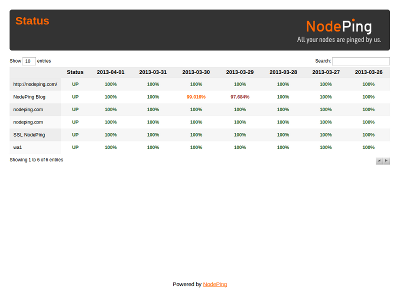
Public Status Pages

One of the frequent requests we get is for a public status page that lists the status of several server monitoring checks in one place. There is a lot to this particular feature, but we’re pleased to announce that the first version of this feature is now available on NodePing.

NodePing Status ReportThe status report allows you to select any of your active checks for listing on the status page. Any number of checks can be included. Just go in to the Reporting tab under Account Settings and select the checks you want to have displayed. The tab also shows the URL for your status report page.

The report has a “title” field, which is displayed at the top of the page. This field supports HTML, so you can add tags to style the look of the top of the page. That includes using an img tag to show your logo or other branding type information at the top of the page. For examples, you can look at https://nodeping.com/reports/status/MTSL1PQUZC and https://nodeping.com/reports/status/P9H0LI94W7. Script tags and other cross site scripting will be filtered. Provider accounts have additional control over the look of the page using the site branding features.

We didn’t want to just start publishing information without allowing people to opt-in to this featuer, so by default this report is not enabled. Enabling it is just a few clicks.

There are a number of additional features that we plan to add to this report, including more customization, links to individual check result pages, and custom URLs. In the meantime, feedback and suggestions are always welcome at support@nodeping.com.

IP Address Changes – [TX and NJ]

Our probe servers in Texas [TX] and New Jersey [NJ] will be changing IP addresses on 2013/04/02:
TX will change from 69.164.201.21 to 204.11.60.100
NJ will change from 96.126.109.97 to 108.61.56.241

No data loss is expected. There may be a few minute delay when any of your checks running on the current probe servers are moved to the new ones.
We apologize for any inconvenience.
Please adjust your firewalls appropriately so your checks are not blocked.

A current and updated list of all the IP addresses for our probe servers can be found in the FAQ.

[UPDATE – 2013-04-02] – The change is complete.

Minor API enhancements added today

We have a couple of updates to our API.

You can obtain the current status of your checks using /api/1/results/current. This returns a list of checks that currently have an “event,” which means that the check is currently disabled or is listed as “down.” The information returned will include a timestamp when the event started. Checks not listed in the results for this call are currently “up.”

We’re also adding a couple of convenience tweaks. When you are getting a list of checks, you can add a “current” parameter in order to have any current events added to the check information. This basically mixes the information from the “current” call mentioned above in with the list of checks.

Additionally, when you are getting a single check, you can add a “lastresult” parameter to the request and get the most recent result for that check along with the check information.

All three of these changes are included in our API Reference documenation. Hopefully these minor enhancements will be of help. Feedback is welcome here or at support@nodeping.com.

Sendgrid’s outage impacted our notification systems

Our notification systems use Sendgrid for email delivery. Overall, Sendgrid has been very reliable and a solid service provider. Today Sendgrid had a fairly significant outage, and that has impacted the timely delivery of some of our email notifications. Obviously for a service like ours this is a big deal.

We are in the process of reviewing our notifications infrastructure to see how our failover systems can be improved to make sure our notifications always get out in a timely fashion. Our apologies to our users who were impacted by this problem.

If you have any questions about this issue, please feel free to email us at support@nodeping.com.