Public status reports updated
2013/04/12 Leave a comment
We announced the initial release of our public status pages for our web site and server monitoring service a couple of weeks ago. These pages allow you to have a public status page for all of your servers and websites in one place. Since then, we’ve worked to add some additional enhancements that we think will be particularly useful.
First, we’ve added custom domains. This allows you to set up a URL such as https://status.example.com as your public status page. Just add a cname record to your DNS to point the domain to nodeping.com, and add the domain or subdomain to the report settings in your NodePing account (under Account Settings -> Reporting), and the custom URL will be available within 30 seconds or so. Once you have a custom domain set up, all of your public reports are available on that domain.
We’ve also added links to reports on individual check results. Any checks for which you have enabled public reports will include a link on the status page to go to the individual report. At the same time, we tweaked the individual results report so that the long list of results only shows if you click on the “Show Details” button. We got some feedback that the whole list is a little overwhelming, so we’ve made the information still available but not shown by default.
Finally, we’ve made a few cosmetic tweaks to the reports and to the reports settings page.
We have a number of additional features and enhancements we’re planning to add to these reports still, but we hope what we’ve done so far is already useful to everybody. As always, feedback and suggestions are welcome. Let us know what you think at support@nodeping.com, by posting comments here, or by using our Contact Page.
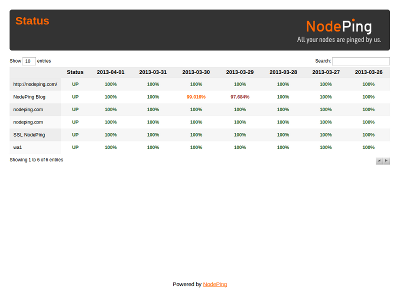 The status report allows you to select any of your active checks for listing on the status page. Any number of checks can be included. Just go in to the Reporting tab under Account Settings and select the checks you want to have displayed. The tab also shows the URL for your status report page.
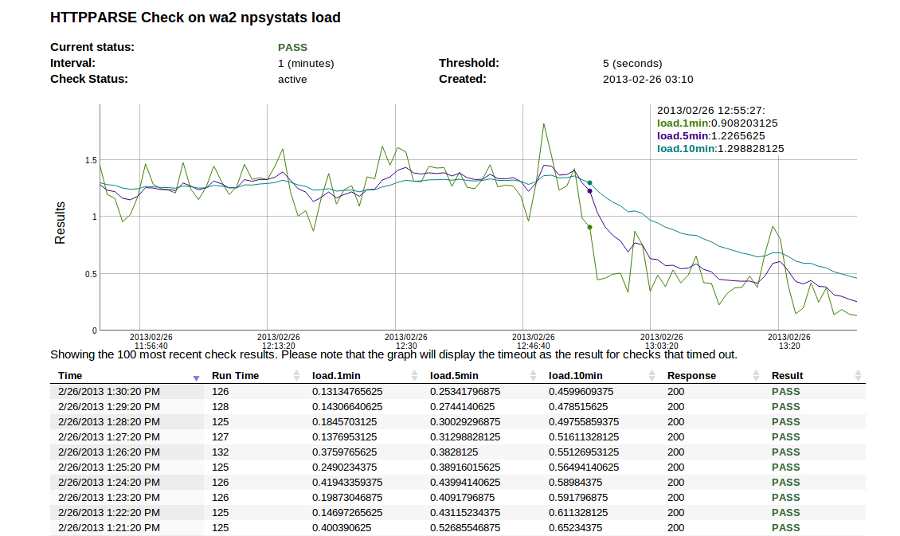 Our use of this check at NodePing is to monitor server health. As you can imagine, running a service like NodePing means we have a number of servers all over the place. We use this check to monitor server load, free memory and disk space on a number of our servers.
 NodePing’s monitoring services were largely motivated by the desire to make widespread monitoring of web sites and other Internet accessible services as simple and automatic as possible. One of the reasons I’m so excited about our suite of
  NodePing