Starlink Monitoring with NodePing

With a Starlink antenna on hand, we thought it would be a fun experiment to see what the results would be of monitoring a Starlink connection from a residential connection with our AGENT check type. The AGENT check can be used to monitor any outbound connectivity from your location on any network. Starlink was an interesting case study for us to try our AGENT monitoring from. Some information we wanted to see was:

  1. ICMP reliability
  2. Packet loss out to the internet
  3. HTTP connections
  4. DNS queries

We targeted a handful of popular services, including our own blog page as well as a website that is hosted in Seattle. We targeted these DNS providers:

  • Google DNS
  • Quad9
  • Cloudflare
  • OpenDNS

For popular websites, we targeted:

  • Facebook
  • google.com
  • Our blog (WordPress)
  • An employee blog site in Seattle

These were all tested over IPv4 and IPv6, each website had its DNS record monitored over the different DNS providers, as well as HTTP monitoring directly to an IP address for that site to rule out DNS issues.

Hardware

To connect to Starlink’s network, the standard antenna was used. The computer was a Raspberry Pi 4 running Raspberry Pi OS.

ICMP Monitoring

The route that was taken from my current location was through Starlink’s network and then back down through Seattle and then out to the rest of the Internet. Below is an MTR from the home network to blog.nodeping.com on WordPress:

Start: 2025-06-05T17:10:24+0100
HOST: raspberrypi     Loss%   Snt Drop   Rcv   Last  Best   Avg  Wrst  Jttr Javg Jmax Jint
  1.|-- 192.168.1.1     90.0%    10    9     1    1.0   1.0   1.0   1.0   0.0  0.0  0.0  0.0
  2.|-- 100.64.0.1      30.0%    10    3     7   17.6  17.6  65.5 298.4   5.0 81.7 275. 516.6
  3.|-- 172.16.252.130  40.0%    10    4     6   19.1  19.1  49.6 154.4   5.3 44.0 130. 239.1
  4.|-- 206.224.65.146  40.0%    10    4     6  1192. 654.2 1011. 1192.  55.2 106. 405. 537.7
  5.|-- 206.224.64.37   30.0%    10    3     7   20.5  20.5  30.4  43.6   9.9 10.1 17.5 59.4
  6.|-- 206.81.81.70    40.0%    10    4     6   26.2  19.9  30.2  39.6  13.4  6.0 18.1 32.3
  7.|-- 192.0.78.12     50.0%    10    5     5   27.2  25.0  27.1  29.9   0.6  1.6  4.9  7.2

Each hop is as follows:

  1. Router
  2. SpaceX CGNAT
  3. SpaceX internal IP
  4. SpaceX public IP
  5. SpaceX public IP
  6. Seattle Internet Exchange
  7. automattic

We assigned both PING and MTR checks to our NodePing AGENT. One to have a simple ping to check uptime, and the MTR to monitor packet loss and other networking statistics.

PING Monitors

After a month of monitoring, the results showed that my average ping uptime was roughly around 99.6% for IPv6 and 99.8% for IPv4

The majority of incidents were 1 minute timeouts. Only a few longer outages occurred. A few outages are noteworthy:

  1. A 10 minute outage while the antenna was moved out of the way and obstructed
  2. A 36 minute outage that was consistent with full network downtime shown by the other results
  3. A 7 minute outage that also consistently happened with other checks

The average day showed about 10-20 events when there was typically a 1 minute timeout. This is roughly a 7-day sample of pinging Google’s site:
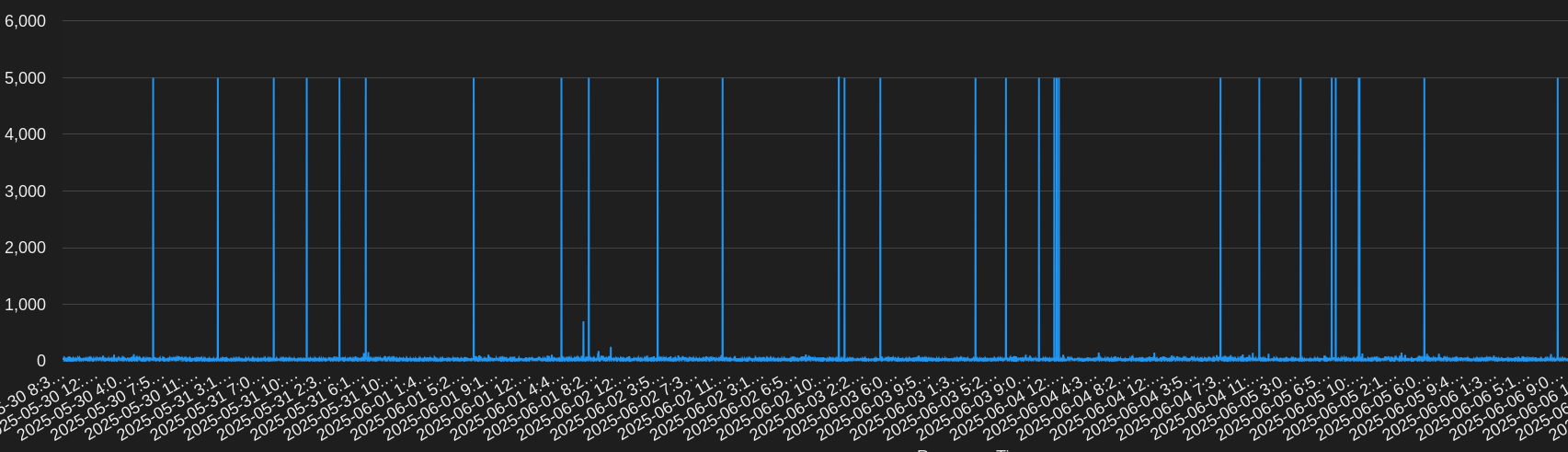
Generally, response times were very good and in the 20-30ms range with some blips up to about 100ms.

MTR Monitors

Our MTR monitoring paints a somewhat similar picture. The average uptime was about 99.7% to 99.9%. This is running an MTR count of 10 and expecting packet loss to be below 5%. Some observations:

  1. A time when Google IPv6 had high packet loss for 9 minutes, at the same time OpenDNS was unreachable for 7 minutes
  2. Moving the antenna was detected just like with the PING checks. This resulted in roughly 10% to 50% packet loss incidents
  3. Like PING, there were quite a few times running an MTR would show packet loss or an unreachable target for a minute
  4. I noticed most of my checks had packet loss more often in the evenings
  5. At one point Google and Facebook had high packet loss or were unreachable for about 40 minutes

Below are some results from the MTR check to Facebook over IPv6:

I noticed that inter arrival jitter was high. The average seemed to be roughly in the 30s, however, it would also frequently go up into the upper 100s. This could potentially impact RTP streams.

Other Monitoring

DNS Monitors

During my testing, DNS checks were rather boring. The overall uptime was 99.9% with minimal timeouts or other issues. One day OpenDNS, Cloudflare, and Google DNS had 3 to 5 minutes of timeouts, but at different times of the day. Some days Quad9 ended up doing worse than others, but overall all the DNS services had that 99.9% uptime. At some times some services would timeout at the same time, but not others. Average responses were around 30-60ms. There were some incidents that happened, but I will expound on those in the next section.

Earlier it was noted that the antenna was moved and obstructed for a little while. All the checks were impacted by this obstruction. However, DNS was not.

HTTP Monitors

Last of all, HTTP monitors. The average uptime was 99.8%. While monitoring HTTP, I was able to use information from my DNS checks to get additional insights into the failures. While an HTTP check will mention it cannot resolve a hostname, the DNS checks provided additional detail into DNS failures and helped me to identify the cause of failed HTTP connections. For example, one day there was about a 5 minute window of failures when some hosts were unable to resolve hostname and others were getting ENETUNREACH errors. My default DNS resolver was Google DNS. At that time, I noticed that the other DNS services were not failing, only Google DNS. With that information, I was able to determine that I was unable to reach my websites because of the DNS provider I was using.

For some of my HTTP checks, I set some of the targets to be the IP address only so DNS was not resolved. At times when failures happened, I could see if the DNS and no DNS checks were failing. If they were, the site was unreachable. If only the DNS checks were failing, then the issue was likely with DNS. There was one outage that was 36 minutes long where my DNS and no DNS checks were failing.

The TLS EACCES errors show that a secure TLS connection could not be established. This often happens when there is a networking issue, since I know that the TLS certificates on the end are correct. This is especially obvious here since the TLS connection failures are happening to multiple services.

Conclusion

After a month of monitoring, it is clear to see that there is some network instability with Starlink. The service could not quite reach three 9s outbound. This could be perfectly sufficient for some, however, mission critical services will likely have frequent reachability issues.

Using AGENTs to monitor my Starlink connection provided me with some interesting results. While using our public probes, there were no incidents with the services I monitored. Using an AGENT to monitor outbound connections to services provided useful data to determine connectivity issues to commonly used services. This is useful when you need to monitor for incidents from a Starlink or any other remote connection and respond to them.

If you have any remote POPs that you need to monitor, try out our NodePing AGENTs today. We offer a free, no-obligation 15-day trial. The best way to see if NodePing meets your needs is to try it out.

Monitoring Cached Websites

Websites that use CDN or caching services like Cloudflare or Amazon Cloudfront can be a little tricky to monitor. You need to make sure all the regular website stuff is working along with additional monitoring for the backend web server and the caching service itself.

NodePing has you covered on both ends: the regular website monitoring and some powerful features specifically for monitoring CDN websites.

The Basics

When someone wants to connect to your website, there are 4 things that have to be working correctly:

  1. DNS
  2. Routing
  3. SSL
  4. Web Server response

DNS

If your DNS servers aren’t available, your visitor’s browser won’t be able to translate the FQDN in the URL to a routable IP address so monitoring each of your nameservers is vital to website availability.

Create a DNS check for each nameserver and be sure the query for your FQDN is being answered.

Routing

Now that the browser has the IP address of a web server, it needs to be able to reach out across the interwebs and request content. Incorrect routing and packet loss can make your website unreachable.

Use our PING and MTR checks to ensure that routing is working and that there is no packet loss.

We often get questions from site owners when the monitoring says their site is failing, but they can get to it fine from their device. Upstream connectivity issues are often the reason, and having the PING or MTR check in place and running from different geographical regions can help identify those troubles quickly.

SSL

Visitors expect websites to use industry best-practices for security, including transport encryption using TLS/SSL. You don’t want them to see that embarrassing “Unsafe” warning when they hit your website because your SSL certs are expired or incorrectly configured.

Create an SSL check to warn you before the cert expires.

Web Server Response

If everything mentioned above is firing on all cylinders, the web server will respond to the visitor’s request and reply with the expected content.

Using NodePing HTTP Content checks, you can verify that the web server is returning the expected HTTP response code and content.

With the basics of website monitoring nailed down, there’s a couple of additional challenges that caching services create that need special monitoring.

Monitor the Back-end Server

If your back-end server isn’t functioning, your CDN or caching service will continue to respond normally, at least for a while. But you’ll want to know right away if that back-end server is offline. You won’t be able to monitor that back-end server using the regular FQDN in the URL because it points to the caching service, not your back-end server.

NodePing can monitor a back-end server using an IP in the URL. The IP address can be either an IPv4 or an IPv6 address.

Example: https://192.168.1.1/index.html

Example: https://%5Bfe80::ec4:7aff:fe06:c186]/index.html

Note: When using IPv6, use square brackets around the IPv6 address.

To get the SSL to respond properly, use an HTTP Advanced check and send a special request header of “Hostname” set to the FQDN of the website.

Example: “Hostname” “example.com”

Cache-busting

To make sure the caching service or CDN is able to communicate properly with your back-end server, you need to send an HTTP request to the service with a URL it hasn’t cached. That will force the service to talk with your back-end server to get fresh content. To do that, it has to be a different URL each time it’s monitored. This is called cache-busting.

NodePing has a cool cache-busting feature on the HTTP Advanced check that will slightly change the URL each time it monitors so that it always causes the caching service to talk with your back-end server.

To use cache-busting, modify the URL query string. Add a non-essential element with the value of “{{now}}”. NodePing will replace that value with a millisecond timestamp each time the check is run.

Example URL: https://nodeping.com/?cachebusting={{now}}

When the URL is run, it will look like: https://nodeping.com/?cachebusting=1697232757035

Each time it is run, the value will be different: https://nodeping.com/?cachebusting=1697232816021

Since each URL is unique each time, there will be no cached entry and the caching service will hit your back-end server on each check run. If the service isn’t able to reach your back-end server, it should return a 522 error or something similar, which will make the NodePing check fail and alert you to the issue.

Website Monitoring

Using a CDN or caching service with your website can speed things up but it can also make things break in ways that basic website monitoring may miss. NodePing’s features allow you to ensure that your back-end web server is up and running and that your caching service is operating as expected.

If you don’t yet have a NodePing account, please avail yourself to our 15-day, free trial. You’ll see why those who know, use NodePing.

Beyond “Is It Up?” – Website Monitoring should be Comprehensive

When it comes to monitoring websites, the question most often asked is, “Is the site up?” While this is certainly an essential aspect, the answer hardly paints the whole picture. True website monitoring involves a plethora of factors that can affect the user experience and performance. These factors can often be hidden, and your user’s experience of you site might not be the same as what you are seeing from your network. With NodePing’s suite of tools, you have the ability to dig deep and understand the vital aspects of your website’s functionality. Let’s explore these considerations.

DNS Monitoring

Domain Name System (DNS) is the backbone of internet navigation, converting human-friendly URLs into IP addresses. Monitoring DNS health is crucial as an unresponsive DNS can render your site unreachable. Problems with DNS can be hidden by caching, and we are often asked why we are notifying about a site that seems to be working from the owner’s perspective. The answer is often that the site owner’s browser or DNS caching is making the site appear to be working when in fact for people who haven’t been on the site recently it appears to be offline because of DNS problems. NodePing offers robust DNS checks to ensure that your DNS servers are resolving correctly.

Monitoring Status Codes

Like with DNS, just checking with a browser can also miss situations in which the web server is actually responding with an error because the modern browsers try to show the page if they can. We often get messages from customers who’s website appears to be working but is actually returning status codes that indicate errors on the site. Even if the site looks right in your browser at the moment, you need to know if it is returning a status code in the 500 range indicating the server is throwing an error. Many content management systems or frameworks also return a visible page with a 404 Not Found status. NodePing’s HTTP checks watch for status code problems with your site.

Similarly, it is important to know if your site is properly following redirects. On some checks, you want the monitoring to follow the redirect to ensure that is getting the final page, and that page is responding with a 200 status code. You may also want to test specific URL’s for the 302 response as well. NodePing’s HTTP Advanced check allows you to ensure that a URL is returning a specific redirect response code.

SSL Certificate Validation

SSL certificates encrypt data transferred between users and your servers. Monitoring and receiving warnings about certificate expirations help you maintain trust and protect sensitive user information. Many of our check types include SSL validation, and and there is also a specialized SSL check that warns you if a certificate has a problem, as well as notifying you that your certificate will expire in a certain number of days. With NodePing, stay ahead with timely reminders and validations.

Domain Registration Expiration and the WHOIS Check

Keep track of your domain registration status with NodePing’s WHOIS checks. Understanding the ownership and registration details ensures that you stay in control of your domain and can prevent unexpected downtime.

Monitoring Other Services on the Host

If your website relies on additional services like databases or caching servers, monitoring them alongside the main site is essential. Integrating these checks into your monitoring strategy ensures that all parts of your site are functioning seamlessly.

CDN & Proxy Consideration

Content Delivery Networks (CDNs) and proxies enhance site performance but can complicate monitoring. By monitoring the back-end site directly, NodePing allows you to quickly pinpoint whether the issue lies with the CDN, helping you react quickly to any problems.

Tying It Together

Every notification your receive from your monitoring system should be actionable. Otherwise it becomes noise, and you either waste time or start ignoring alerts and miss important events. It is important to monitor every aspect of your site, but you don’t necessarily want ten notifications when the site is down. NodePing allows you to set a check as being dependent on another check, so you won’t get a stack of notifications if the dependent checks fail together.

Automated Diagnostics

NodePing’s has both on demand and automated diagnostics tools that provide extra insights when your site is down, supplying valuable information to help troubleshoot and resolve issues more efficiently.

Conclusion

Monitoring a website involves much more than merely checking if it’s up. With tools like NodePing, you can dive into a multitude of factors that contribute to your site’s performance and reliability. By understanding and keeping tabs on DNS, redirects, SSL certificates, domain registration, host services, CDN considerations, and more, you ensure a smooth user experience and robust site functionality.

At NodePing, we’re committed to helping you monitor your website from all angles. Get in touch with us to learn how you can take your website monitoring to the next level. If you don’t have an account yet, give it a try with our 15-day, free trial.

Leveraging NodePing’s Web Monitoring for Optimal Website Uptime

Hello, NodePing community and all those striving for flawless website uptime!

In this digital age, achieving uninterrupted website availability is paramount. At NodePing, we provide the tools you need to ensure your website doesn’t just exist—it thrives. This blog post will dive into our range of HTTP-oriented server monitoring checks and how they can address real-world tech business needs.

1. HTTP Check: Your Go-To for Website Availability Monitoring

Our HTTP Check provides a reliable pulse on your website’s status. It connects to your site at regular intervals, confirming that it’s up and responding with a 200 status code within the defined timeframe.

Use case: Online retailers understand the importance of 24/7 website availability. With our HTTP Check, you get an early warning of any potential outages, allowing you to promptly address issues and maintain a seamless shopping experience for your customers.

2. HTTP Content Check: More than Just a Pulse

Our HTTP Content Check takes things a step further by examining the actual content of your site’s response. In addition to checking if your site is up, this check looks for specific content within the response, based on a string or regular expression you provide. It can also make a negative match, making sure that a specific string or regular expression match does not exist on the page. This is great for looking for database errors appearing on the page, for example.

Use case: If you are monitoring a WordPress or other CMS site, you may need to verify that the site is showing specific content on the page, and not just responding with a “No Posts” message.

3. HTTP Advanced Check: Comprehensive Website Monitoring

The HTTP Advanced Check allows for full customization of your website monitoring needs. It’s the perfect tool for comprehensive server monitoring, from request methods and response headers to posted fields and data.

Use case: Tech start-ups with complex SaaS products can benefit from the HTTP Advanced Check. This tool can ensure all components of your site, including complex forms or API endpoints, are functioning as intended.

Leveraging the Suite of Monitoring Tools

One of the big strengths of Nodeping’s monitoring services is how they can all work together to make sure all the pieces are working. NodePing’s checks are designed to work in harmony. If you’re responsible for a web site, it is important to know if the DNS is working properly as well. You might also want to monitor the health and expiration date of your SSL certificates on your sites. And you can use our automated diagnostics to put information about why services are failing their checks directly in your inbox. For example, this can include an MTR to help diagnose when your web host is having connectivity problems. A layered approach provides the most comprehensive picture of your website’s health.

At NodePing, we understand that every website is different, and that’s why we’ve designed a range of checks to meet all kinds of needs. From small blogs to complex e-commerce platforms, our checks can help you ensure your site stays up and running.

So why wait? Dive into our documentation, explore our checks, and make sure your website’s heartbeat is as steady as ever. We also have a free trial 15 day trial. And remember, we’re here to help. If you have any questions or need assistance, don’t hesitate to get in touch!